Windows Live und Hotmail können fast wie bisher in Outlook 2013 (Preview) verwendet werden. Allerdings funktioniert die automatische Suche der Mail-Einstellungen noch nicht. Vielleicht wird sich dies mit der finalen Version ändern. Diese wird ohnehin in nicht allzu ferner Zukunft, voraussichtlich Q1/2013 auf dem Markt erscheinen.
Wie bekommt man sein Outlook 2013 Preview dazu sich mit Hotmail/Live oder Outlook.com zu synchronisieren?
Beim Start von Outlook und dem Anlegen eines neuen Profils bzw. eines Postfachs muss die Einstellungen für Hotmail o. ä. manuell eingetragen werden. Die folgenden Screenshots zeigen dies exemplarisch.
- Einstellungen manuell machen

- Mail Server: m.hotmail.com
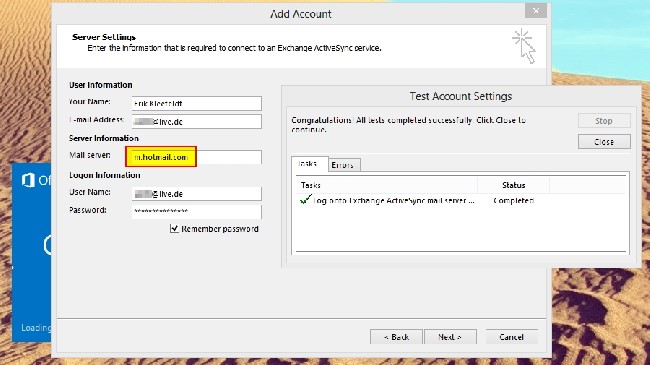
Damit sollte es klappen! Bei Fragen einfach einen Kommentar hinterlassen.
Viel Spaß mit Outlook 2013 (Preview).







 erik365.blog
Comment / Kommentar verfassen