Manage Microsoft Teams Rooms (MTR)

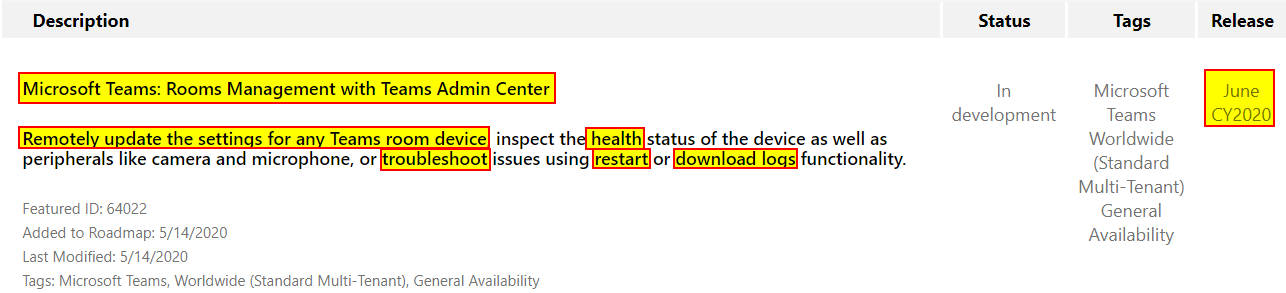
Soon, Microsoft Teams Meeting Rooms (MTRs) will be (remotely) managable via the Teams Admin Center, as described on the Microsoft 365 Roadmap [ID 64022].

  • update settings for Team Room Devices
  • monitor and check health status of Teams Room Devices incl. peripherals (camera, mic)
  • troubleshoot a MTR by remotely restart the devices
  • troubleshoot a MTR by remotely download logs
Source: https://www.microsoft.com/en-us/microsoft-365/roadmap?filters=&searchterms=64022

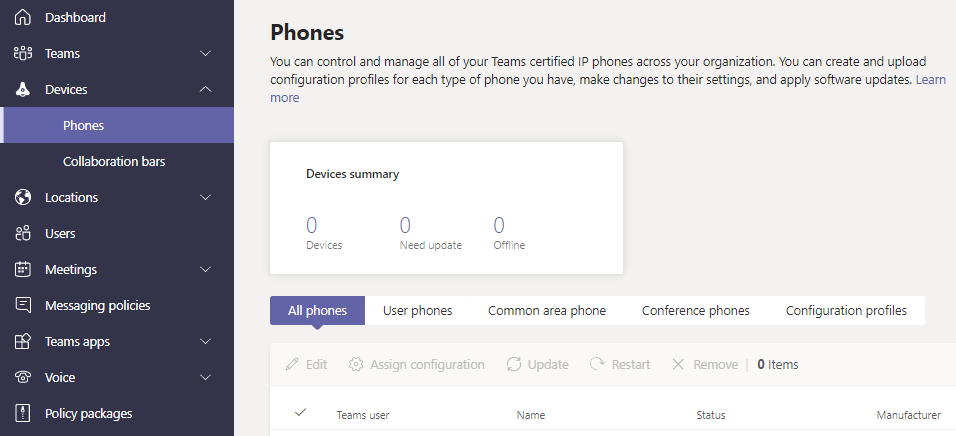
I assume that the admin experience will be similar to what is already available to manage Microsoft Teams Phones and Collaboration Bars.
Source: Microsoft Teams Admin Center (Screenshot)

Additional resources


Discover more from erik365.blog

Subscribe to get the latest posts sent to your email.

One response to “Manage Microsoft Teams Rooms (MTR)”

  1. What’s Microsoft Teams Rooms managed service? – Erik's Blog Avatar

    […] Manage Microsoft Teams Rooms (MTR) – Erik’s Blog (erik365.blog) […]

    Like

Comment / Kommentar verfassen

I’m Erik

Welcome to Erik’s blog, your go-to space for curated updates and insights on Microsoft Teams, Copilot, and Microsoft 365. Join me as we explore the latest developments, share valuable information, and spread knowledge. This blog not only serves as a source of news but also as my personal collection of notes, openly shared with you all. Let’s elevate teamwork and productivity together!

Let’s connect





