Microsoft Teams Call Queue no agents opted or logged in

Have you ever wondered how to cope with calls in Call Queues if there is no agent signed in? Well, there is another option now available which enables you for building smoother call flows in Microsoft Teams. The following screenshots will show you what’s new and what can be configured.

Source: Microsoft Teams Admin Center

This section with “No Agents Opted/Logged In” is new (July 28, 2023).

Source: Microsoft Teams Admin Center

As you can see here, there are four settings available. First of all, you can decide if the setting should only be applied for new incoming calls (or all calls/callers in the queue).

The next thing you can configure is what you would like to happen if there is no agent online (available to be called/opted in the queue) for this queue. Well, “Disconnect” is the worst you could do for a smooth call flow (if the call flow’s termination/end is not reached), and queuing “Queue call” is the default, so that’s why there is “Redirect call to“.
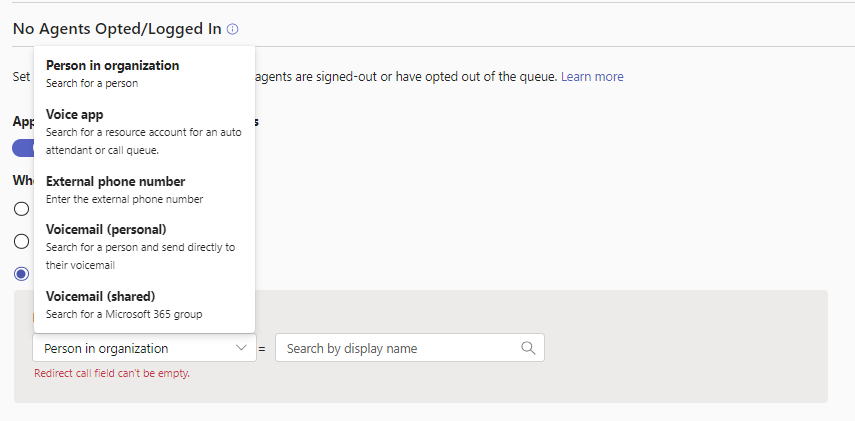
Source: Microsoft Teams Admin Center

“Redirect call to” should be the way to go and that’s where you can define what should happen in case. So there you’ve got the common and known options available to forward it to “Person in organization“, “Voice app“, “External phone number“, “Voicemail (personal)” or “Voicemail (shared)“.

Conclusion, opinion and summary

Alright, that’s pretty nice! It can help in certain situations to leave no caller behind if (suddenly) agents are opting out for receiving calls or are not logged in anymore. To me this is defintly going to be a standard I’ll direct leverage in my Teams telephony projects with call queues.

Resources


Discover more from erik365.blog

Subscribe to get the latest posts sent to your email.

2 responses to “Microsoft Teams Call Queue no agents opted or logged in”

  1. Jeroen van Dongen Avatar
    Jeroen van Dongen

    Hi Erik, Thanks for the great article, but I have a comment about this line: “what you would like to happen if there is no agent online for this queue.” After testing myself and reading Microsoft documentation, it seems that the call queue does not look if the agents are online. With present based routing disabled: The trigger is based on user options to check out from the queue. With present based routing enabled: Above option is combined with the Teams status: Appear offline. So, not offline, but appear offline.. the status which you can only set manually..That it doesn’t really trigger on people being offline, was a dealbreaker for a customer. I hope that Microsoft will improve this. If there is a different solution, please let me know!

    Like

    1. erik365online Avatar

      Hello Jeroen,

      Thank you for your comment and feedback.

      I see what you mean, and I’d like to clarify my wording: by “online”, I mean logged in, opted in to the queue, or otherwise available to receive calls from the queue.

      Presence-based call routing means exactly that: “Call agents whose availability status is set to Available are included in the call routing list and can receive calls.” So if an agent sets their presence to Available (green), they are eligible to receive calls — depending on the configured routing method and any busy options (e.g., Busy on Busy).

      However, if the agent sets their presence to anything other than green/Available, they will not receive calls when presence-based routing is enabled. In other words, when a user sets their presence to “Appear offline”, Microsoft Teams treats that as “Offline” for routing purposes — meaning they won’t receive call queue calls in this state. The logic skips users who are Offline, in Do Not Disturb, or otherwise marked unavailable, depending on the call queue’s routing configuration (e.g., Attendant, Round Robin).

      So even though the user may technically be signed in and active, manually setting their status to Appear offline signals the system not to route calls to them.

      What outcome are you or your customer hoping to achieve? It sounds like the goal is for users to be able to set “Appear offline” yet still receive call queue calls?

      From my perspective, using Appear offline undermines good communication and collaboration. It’s hard to tell whether a colleague is truly offline, busy, in focus mode (DND), or just away.

      Best regards,
      Erik

      Like

Comment / Kommentar verfassen

I’m Erik

Welcome to Erik’s blog, your go-to space for curated updates and insights on Microsoft Teams, Copilot, and Microsoft 365. Join me as we explore the latest developments, share valuable information, and spread knowledge. This blog not only serves as a source of news but also as my personal collection of notes, openly shared with you all. Let’s elevate teamwork and productivity together!

Let’s connect





