
Microsoft announced the end of service and deprecation for the basic public IP address (SKU) on Azure, on October 7, 2023. The basic public IP SKUs will reach end of service on September 30, 2025.

You now might wonder why do I write this here? Well, I received a friendly reminder these days, about the upcoming change due to my workloads on Azure relying on it right now. If you are running Microsoft Teams Direct Routing with a session border controller (SBC) on Azure this might affect your calling services. In case you rely on a public IP-address, what you usually do for Teams Direct Routing, the one you use could be a basic public IP-address (SKU)? If you do not know if you are using a basic or standard public IP SKU you better check this. If you use a basic public IP SKU, you need to take action and make a change before the deadline is reached. Otherwise your calling services provided via Teams Direct Routing with an SBC on Azure will be disrupted starting September 30, 2025. To avoid the disruption better start to plan for the change early enough. In the following sections I provide you a compact guide on how to check and change or upgrade to the standard public IP SKU.
This upcoming change does not apply for basic SKUs in Azure Cloud Services (extended support).
Check public IP SKU in the Azure portal
- Open your Azure portal https://portal.azure.com
- Search for public …

- Click on Public IP addresses
- A list of all your public IP appears

- Check the column SKU to see whhich public IP addresses are based on the basic SKU.
- Start to plan the required tasks towards changing to the standard SKU
Upgrade from basic to standard public IP SKU in Azure portal
In this example I demonstrate how you can upgrade from a basic to a standard public IP SKU for a Teams Direct Routing SBC (Audiocodes Mediant VE). The public IP address in this example is a static public IP address.
Please note that other services relying on basic public IP might require a completely different approach and do not allow a simple upgrade task execution. This might be subject to change at any time. Do not implement this change without any precautions and proper planning etc. because this can disrupt your services' availability.
- Based on the above list you can open a public ip of the basic SKU type.

- Click on Upgrade to Standard SKU – Microsoft recommends Standard SKU public IP address for production workloads
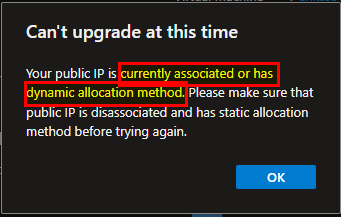
- I cannot yet upgrade the public IP because it is still associated.
- Alright, the next steps are causing a down time for my SBC and calling for Teams Direct Routing relying on this SBC
- I dissociate the public IP from the SBC

- A warning requesting a confirmation appears after clicking dissociate
- I’ll take a note on the resources name/eth interface and the public IP’s resource name, so that I later know how it was associated.
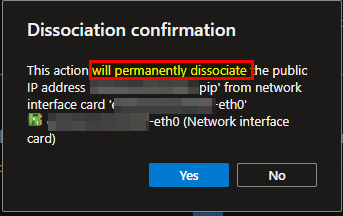
- I confirm with Yes and the process is started


- Now I retry to to upgrade it
- I confirm that I acknowledge the upgrade etc.

- I wait just approx five seconds

Source: Screenshot Azure portal public IP address upgrade completed
- Upgrade completed successfully
- I check the public IP’s details

Source: Screenshot Azure portal public IP address details (now SKU Standard)
- Now the SKU is Standard
- As next step I re-associate the public IP to the IP interface of which I dissociated it earlier


- Finally, I checked the PIPs details and all looks fine.
- The public IP address was not changed, only the SKU was changed from basic to standard.
- I can access the services, the SBC via browser with the existing and unchanged URLs (no DNS record was changed)

Conclusion, opinion and summary
The upgrade process in my case was straightforward and I did not run in any issues. Nevertheless, it is important to plan this task within a maintenance window because it can take some time to accomplish all the steps above. During the process your services are down and unavailable.







 erik365.blog
Comment / Kommentar verfassen