
In this post I want to share two recent and interesting Teams calling announcements and news. Both are about reporting and near real-time monitoring of calls. You may have already seen it a few days ago if you follow me on LinkedIn.

Today if you are relying on Teams Auto Attendants and Call Queues there is not much reporting and monitoring. Alright, there is the Call Quality Dashboard (CQD), PowerBI (Templates) and some reports you can find in the Teams Admin Center (TAC). In many cases this might be sufficient but in total it is not. These current features do not allow to have an insightful calling experience within a Teams Auto Attendant and Call Queue setup, in my opinion. Auto attendants and call queues let you set up and run call flows and enable automatic call distribution (ACD). But without any details on current call metrics, like how many calls are ongoing in the call flow (within a call queue), how long does it take till a call is answered, missed/answered details calls in a queue (!!!) and so one. In case you need this today you need a third-party service covering this or built something by yourself. I probably would go with “buy/subscribe” instead of “develop” because there are many good, certified Teams services and solutions available depending on the specific requirements.
Call Record Insights for Microsoft Teams
I was surprised and excited to see the announcement and release of Call Record Insights for Microsoft Teams. This is a solution which is provided by Microsoft via GitHub and can be deployed as and if needed. It utilizes Microsoft Graph API and some Azure resources.
The result could look like this dashboard which provides you insights of your telephony and calling usage for Microsoft Teams:

Queue app
The next recent announcement for H2 2024 also made me listen up: The Queue app! Well, what’s so special about it? It’s pretty nice that it enable agents and supervisors of a call queue to see call metrics. As the graphic of the announcement states it might contain: waiting calls, average call answering time, longest call waiting time, abandoned percentage, total offered calls and unanswered calls.
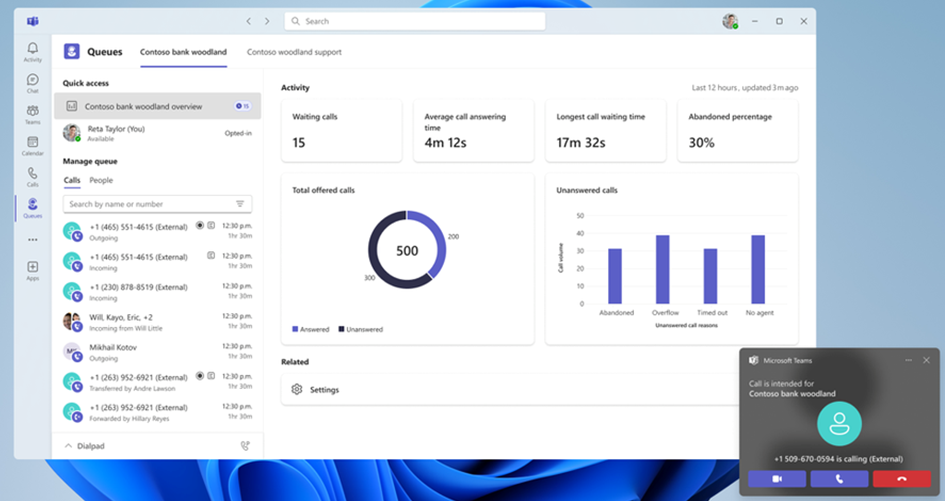
I also hope that we will get some kind of details for missed or unanswered calls to call back. Calling back is – depending on who you ask – crucial! I talked to many people in many projects and there are departments like sales or customer service who would like to call back if a call could not be answered. Although you can set up call flows in Teams that no call is dropped (worst case) and gets re-routed to another call queue or else, this is often not what the requesting people want. They often want and require an overview to call back. And in my opinion therefore today’s Teams calling capabilities in call queues are not natively offering what should be common sense or a common feature. Today this requires another service and solution to gain a holistic insight into calling for call queues. Don’t get me wrong there many options available today to cope with this somehow but not exactly that what is very often requested.
Now you might understand why I’m so curious and thrilled about the announcement of the queue app for Teams calling. I’m looking forward to test this in H2 2024 as soon as I notice it is available.
Conclusion, opinion and summary
In my view, it is a long-awaited and necessary improvement to have more call details in Teams (Auto Attendants and) Call Queues and to make them easily accessible. I understand that this might be a complex task because it needs to balance the needs of a wide range of Teams call queue users and not to compete with the services and solutions provided by the Microsoft partner ecosystem and business. However, I am confident and sure that the Microsoft partners who develop services and solutions in this specific area offer much more and in-depth solutions compared to what is being provided here natively.
Stay tuned on what’s next and let me (in the comments) know what you think about the upcoming queue app as well as the Call Records Insights?








 erik365.blog
Comment / Kommentar verfassen