
Happy New Year to everyone. I hope 2025 started well for you. In this post, I would like to share a few wishes for Microsoft Teams in 2025 and beyond. The last wish list I wrote was from 2022, so it’s time for a new one and to recap what has happened so far with the wishes of 2022.

Table of contents
- From Wishlist to Reality: Microsoft Teams Enhancements since 2022 🎉🚀
- Minimalistic Teams app view
- Full collaboration support for guests
- New role (concept) for Teams in Microsoft Teams
- Global Address Book and Contact Management in Microsoft Teams
From Wishlist to Reality: Microsoft Teams Enhancements since 2022 🎉🚀
In my 2022 blog post, I highlighted various feature requests and improvements for Microsoft Teams. Some of the key wishes included better meeting controls, enhanced collaboration tools, improved performance, and more customization options. Overall, my post reflected a desire for a more efficient and user-friendly experience.
I’m pleased that many of the features I wished for have indeed been implemented over time. Microsoft Teams has seen significant updates, incorporating many user requests to enhance functionality, streamline workflows, and improve overall user satisfaction.
It’s great to see how feedback and feature requests have shaped the evolution of Microsoft Teams! Don’t stop here, there is still space for improvement.
Wishlist 2025
In this section, I would like to share a few wishes for Microsoft Teams and Co. that have come to my mind over time. 🤔
Minimalistic Teams app view
Microsoft released a new view which now brings chats and teams together. I like it but I’m not yet sure how users will like it.
To this day, it is difficult for normal end users to distinguish between a chat, group chat and conversations in channels in teams. In the many workshops and training sessions I have held over the past few years, I have always invested a lot of time in explaining to end users when and how to use what and what the differences are. In my opinion, the end user is not interested because they simply want to get on with their work and already have a lot of issues on their plate that perhaps have nothing to do with their actual job. Learning, understanding and making sense of a (complex) tool that is also subject to frequent changes is a major challenge. Good change management alone is not enough.
Perhaps it would be a good idea to significantly improve the client and its usability. Fortunately, it is expected that soon there will be the possibility to resize the Teams client, specifically the left Chat/Teams/… panel and the right content panel.
The idee is not to be mixed up with the high density view, which already exists. It is more about a minimalistic view to stay focused on what matters most for you. I just made a quick drawing which shows two windows wich are decoupled of each other.
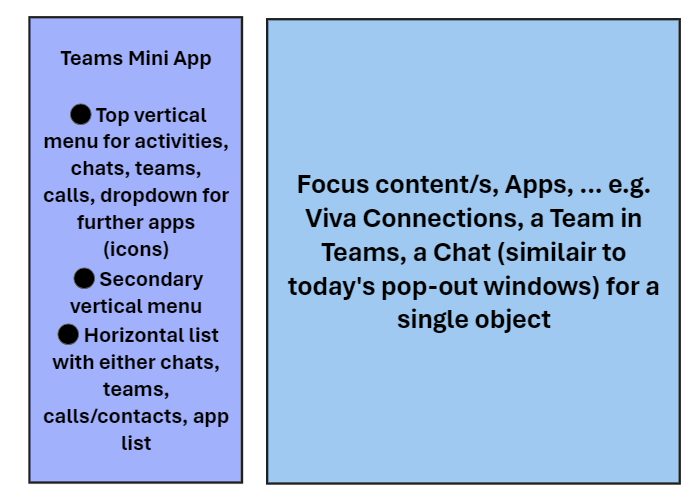
The “Teams Mini App” as a small app should be decoupled and independent of the “[Teams] Focus content app”. This should help to keep the focus to what matters most for you. Today Microsoft 365 Copilot etc. are helping us to keep tracking of activities and get our day more structured to be more productive. However, There is still a load of clutter, bit and pieces which can cause distraction. I claim that a clean app and desk would support enhancing producitivty? With a “no-frills” app view option this could be achieved in my opinion. Furthermore this could enable additional and specific view configuration for first-line workers, Teams Phone call attendants and many more based on existing Teams setup policies.
Link to feedback portal: NA
Full collaboration support for guests
Today’s guests in a Team in Microsoft Teams do not have the full collaboration capabilities that members do. This can be an advantage or a disadvantage. In my opinion, this is often a blocker and a limitation. When I’m invited to join a Team in Microsoft Teams in another Microsoft 365 tenant, I can participate in some basic collaboration. However, I cannot create new channels or manage anything like a member or an owner can. Why is this limiting? Well, I’m often hired as an external consultant and/or project manager. I cannot set things up as I would like to as a guest user. To do more, I need to be at least a member in a Team in Teams. This is generally possible, but an owner of a Team cannot make a guest a member or an owner.
This is probably inherited from the Entra ID user type, which is classified as a guest and also impacts licensing, etc.? However, a simplification and enhancement could make things easier for scenarios where an external user should get permissions in a Team similar to owners or members.
This is would be nice to have already and without Entra ID B2B trusts for a more seamless collaboration based on Entra ID B2B capabilities, like cross tenant sync or else.
Guest experience in Microsoft Teams – Microsoft Teams | Microsoft Learn
Link to feedback portal: NA
New role (concept) for Teams in Microsoft Teams
Today there are three roles and permissions available: Owner, Member, Guest.
I would like to see a rethought and new role concept for teams within teams that enables more diverse authorizations across the board. In other words, new owner and member roles that receive fewer permissions by default and directly. In my opinion, this would be practical for some larger teams from time to time.
On the other hand, it could cause confusion for many users because it increases complexity. On the other hand, multiple roles with granular permissions could enable better control, especially for larger teams. In the overall context of Microsoft 365 Groups, however, this could probably be an extremely difficult matter.
One advantage I see in this is that predefined structures (channels, …) cannot be shaken, especially if processes and automation are to be used to provide teams in Microsoft Teams according to a specific standard for a specific purpose. A technical solution could be helpful, which could save time and money in the area of change management and end user support.
Link to feedback portal: NA
Global Address Book and Contact Management in Microsoft Teams
Still, a centralized or global address book would be pretty nice, wouldn’t it? The wish was called “Centralized address book and contact management” in 2022. I’m often asked how we can add contacts to people’s contact lists. There were enhancements, but we are not yet where others and I would like to be. I have seen that there are options with Graph API, PowerApps, and third-party solutions/services, but those are workarounds, in my opinion.
A central or global address book should contain all contact objects and data such as first name, last name, title, phone numbers, etc. (from Entra ID). Additionally, adding a third-party address book via LDAPs/HTTPs/REST API/… would be marvelous. Each person should be able to view all contacts in their personal Exchange mailbox. In Teams, calling these contacts should be used for reverse number lookup (RNL).
Admins should be able to adjust and control the address book, especially to scope it and assign only certain address book scopes to a group of users or devices (Teams IP Phone accounts, room system accounts). This should be similar to Exchange address book policies.
Link to feedback portal item and/or another one (similar)
Conclusion, opinion and summary
That’s it for now. These are my favorite feature wishes for 2025. What are yours?
Always keep in mind to provide a feedback so that your ideas are visible for others and getting the chance of being seen and heard. For example you can start or follow threads within the Microsoft Tech Community or create a new feedback, share it to get it up-voted or vote ones up. In my opinion, the feedback portal appears to be poorly maintained and infrequently viewed but you can give it a try.
Have a good, healthy and productive 2025.
Additional resource
- Tech Community
- Microsoft Feedback Portal







 erik365.blog
Comment / Kommentar verfassen