
This post is a reminder that the switch to the new Microsoft Outlook Client is ahead. Companies and users which are licensed with business plans are facing the switch this month (January 2025) if nothing is done to mitgate it.
For Microsoft 365 for Enterprise users the switch will start in April 2026 (screenshot below) but Microsoft 365 for Business users will expierience the switch to the new Outlook starting this month.
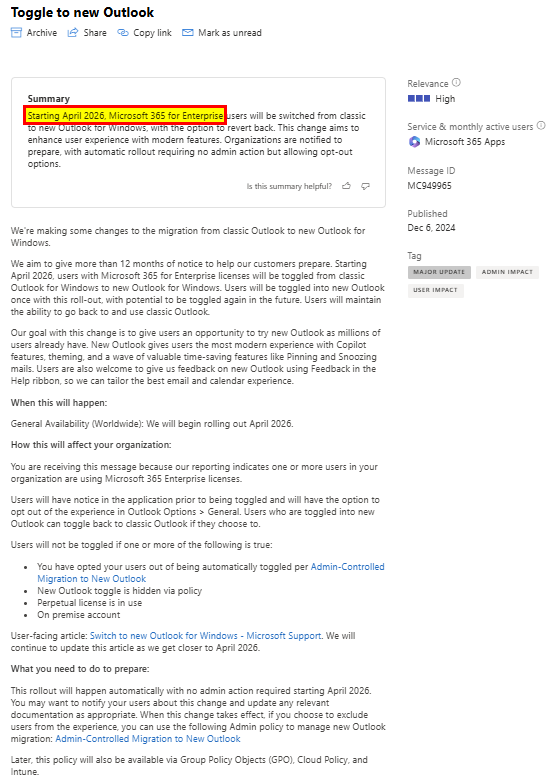
Why Now is the Time to Act
- Stay Ahead of the Curve: Early adoption of the new Outlook Client ensures that your business can leverage the latest tools and features, staying one step ahead of competitors.
- Maximize Productivity: The functionalities of the new Outlook Client are designed to enhance productivity. By transitioning early, your team can start benefiting from these improvements immediately.
- Minimize Disruption: Planning and executing the transition now allows for a smoother and more controlled process, minimizing potential disruptions to your business operations.
- Prepare for the Future: As Microsoft phases out the old Outlook Client, staying updated with the new version ensures continued support and compatibility with future updates and integrations.
Steps to Get Started
- Evaluate Your Current Setup: Assess your current status (license plans, functional requirements …) to identify any potential challenges or areas for improvement during the transition.
- Plan the Transition: Develop a detailed plan that outlines the steps and timeline for the transition. This should include allocating resources, setting milestones, and communicating with your team.
- Training and Support: Ensure that your team is well-prepared for the new Outlook Client by providing training sessions and access to support resources. This will help them quickly adapt to the new interface and features.
- Monitor and Optimize: After the transition, continuously monitor the performance and gather feedback from users to make any necessary adjustments and optimizations.
Conclusion
The transition to the new Outlook Client for Microsoft 365 is a major change espeically in the user experience. That’s why you should act now, you can ensure a smooth and successful transition for continued, seamless and functional operaton regarding Microsoft Outlook. Are you ready to cope with the change for a seamless and efficient transition to the new Outlook Client? In case you are not yet ready you can get prepared and initate required measures.
Resources
- Erik365: “🚨Watch out in Jan 2025: Forced switch to the new Outlook for SMB customer / Microsoft 365 Business plans if you don’t act 🚨🔗👇” — Bluesky
- Microsoft 365 Message Center Notification MC949965
- Switch to new Outlook for Windows – Microsoft Support
- Control installation and use of new Outlook – Microsoft 365 Apps | Microsoft Learn







 erik365.blog
Comment / Kommentar verfassen