
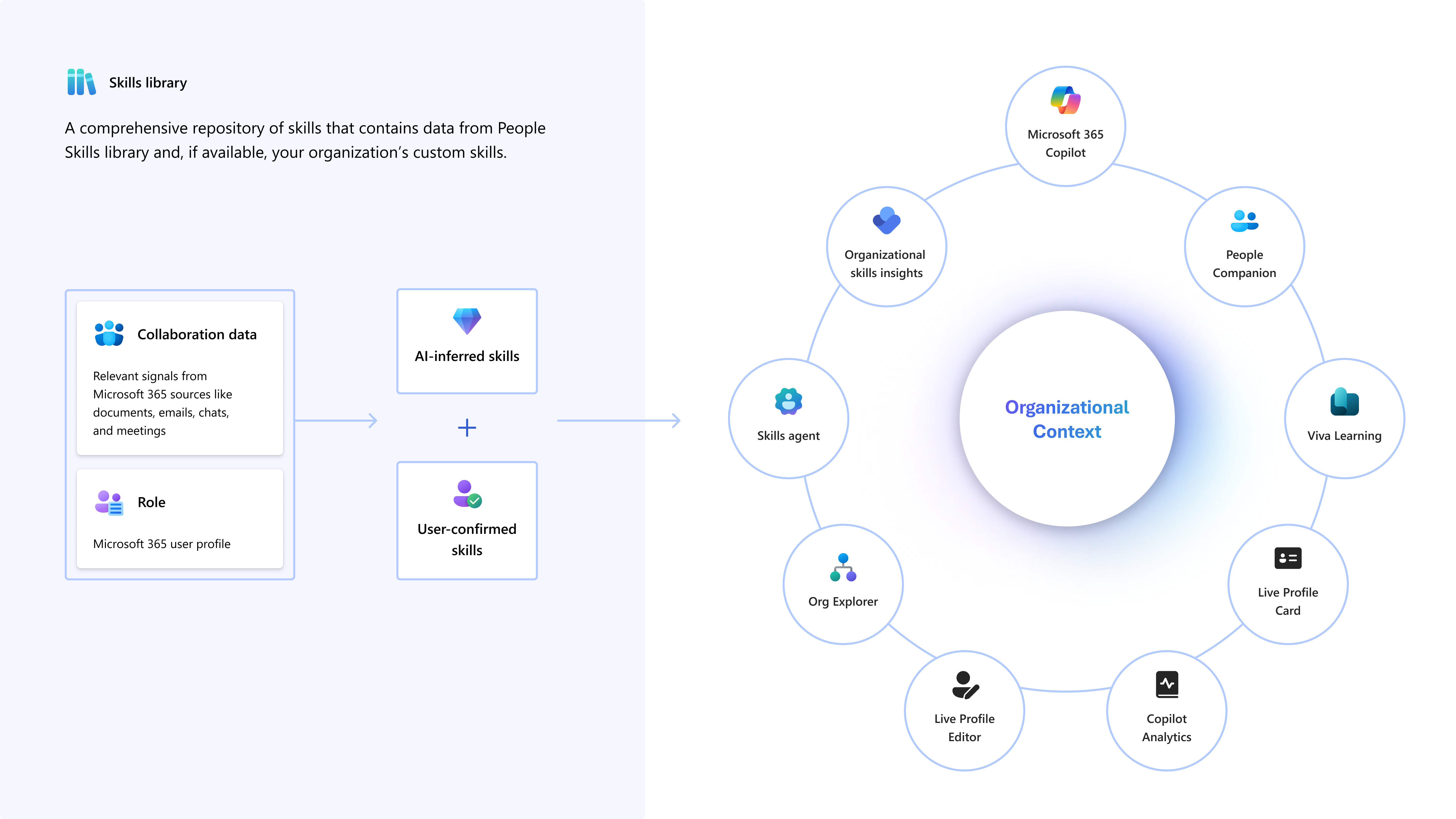
In this post, I want to provide an overview of People Skills in Microsoft 365. First of all, what is People Skills? To keep it short, it is an AI-driven Microsoft 365 capability that helps organizations manage and view employee skills. It leverages Microsoft 365 Copilot, Microsoft 365 services, and Viva to create personalized skill profiles and enable skills-based experiences across the Microsoft ecosystem. Furthermore, it powers the Skills Agent, which helps you find colleagues with the expertise you need for a specific topic or project.
Contents
- What is People Skills and Why Does It Matter?
- What’s the Business Value for Organizations
- Core Components and Integrations
- How Can Users Benefit? Where Can Users Interacting with It?
- What are example use cases?
- What are the prerequisites?
- What about other Providers?
- Conclusion, opinion and summary
- Resources
What is People Skills and Why Does It Matter?
Before diving into the technical details, let’s start with the big picture: why does this feature exist and what problem does it solve? In a world where skills are the new currency, organizations need a dynamic way to understand and leverage their workforce capabilities. People Skills addresses this challenge by using AI to infer and manage skills from everyday work signals.
It provides:
- Personalized skill profiles for employees.
- Workforce insights for leaders to identify skill gaps and plan upskilling.
- Enhanced collaboration by making it easier to find the right expertise within your organization.
What’s the Business Value for Organizations
Now that we know what People Skills is, let’s explore why it matters for businesses. Beyond being a neat feature, it delivers benefits that impact productivity, talent management, and strategic planning. Here are some of the key advantages:
- Improved Talent Discovery: Quickly find experts for projects or problem-solving.
- Upskilling and Reskilling: Identify skill gaps and recommend learning paths via Viva Learning.
- Better Team Formation: Build project teams based on real-time skill data.
- Data-Driven Decisions: Leaders can analyze skill distribution and plan workforce development.
Core Components and Integrations
To understand how People Skills works, it’s important to look at the building blocks behind it. This feature doesn’t exist in isolation. It’s integrated with other Microsoft 365 services and tools.
- Microsoft 365 Copilot: Surfaces skills in Copilot chat for people-related queries.
- Microsoft Viva: Connects with Viva Learning for personalized learning recommendations.
- Microsoft Graph: Uses activity signals to infer skills.
- LinkedIn Skills Taxonomy: Provides a base library of 16,000+ skills, customizable by organizations.
How Can Users Benefit? Where Can Users Interacting with It?
So, what does this look like for employees in their daily work? People Skills is designed to be intuitive and accessible, surfacing in familiar Microsoft 365 experiences. Here’s how users can interact with it:
- Profile Card in Microsoft 365: View and manage skills in Outlook, Office.com, SharePoint and more
- Org Explorer & People Companion: Search for colleagues by skill
- Viva Learning: Get learning recommendations based on your skills
- Copilot: Ask questions like “Who in my team has experience with Power BI?” and get instant answers.
What are example use cases?
Finally, let’s bring it to life with some practical scenarios. These examples show how People Skills can make a real difference in everyday work:
- A project manager needs a data visualization expert: He/she can search within People Skills or ask Copilot.
- HR teams can analyze skill gaps and plan targeted training programs.
- Employees can showcase their skills and discover internal opportunities aligned with their expertise.
What are the prerequisites?
Before you can use People Skills, there are some requirements to consider. These include licensing options and technical configurations that ensure People Skills works seamlessly in your environment.
Licensing
People Skills does not require a separate license. It is included with:
- Microsoft 365 Copilot licenses (full AI inferencing and Copilot integration).
- Microsoft Viva Suite or select Viva modules (AI inferencing without Copilot features).
- Foundation plan for Microsoft 365 commercial customers (manual skill management, no AI inferencing).
Technical Requirements
- Microsoft 365 commercial cloud (currently excludes EDU and government tenants).
- Admin setup in the Microsoft 365 Admin Center (enable People Skills and configure taxonomy).
What about other Providers?
Microsoft People Skills is a strong choice for organizations already invested in Microsoft 365 but it’s not the only solution out there. There are several specialized platforms offer alternative approaches with unique features and integrations.
Several vendors provide specialized solutions that focus on mapping, tracking, and developing employee skills. These platforms often include advanced analytics, customizable skills taxonomies, and integrations with HR and learning systems. Here are some notable examples:
- Skills Base: A comprehensive skills management platform that enables organizations to identify, assess, and visualize workforce skills. It offers real-time skills intelligence, customizable taxonomies, and integrations with HRIS and LMS tools.
- AG5: Known for its robust skills matrices and compliance features, AG5 is widely used in manufacturing and industrial sectors. It provides predictive gap analysis and certification tracking.
- iMocha: An AI-powered skills intelligence platform that supports skills assessments, gap analysis, and targeted learning recommendations.
- MuchSkills: Focused on visualizing team competencies and promoting transparency, MuchSkills helps organizations plan for future skill needs.
- Cornerstone & Workday Skills Cloud: Enterprise-grade solutions that combine skills management with broader talent and learning management capabilities.
These alternatives can be attractive for organizations that operate outside the Microsoft ecosystem or require highly specialized features. However, for businesses already invested in Microsoft 365, People Skills offers a unique advantage: native integration with Copilot, Viva, and Microsoft Graph, ensuring a seamless experience without additional complexity.
Conclusion, opinion and summary
Before wrapping up, let’s take a step back and reflect on why People Skills matters. We’ve explored what it is, how it works, and the value it brings but the real question is: does your organization truly need it?
The first question you might want to ask yourself is:
Do we need to know what skills our people have in the organization?
In most cases, the answer will be a clear yes. The next logical question is:
Do we need to document this thoroughly, or does everyone already know each other’s skills?
In smaller organizations, informal knowledge might work for a while. But as your company grows, relying on assumptions or personal networks becomes risky and inefficient. That’s where structured skill management becomes essential.
Instead of maintaining outdated Excel sheets or SharePoint lists, People Skills in Microsoft 365 offers an intelligent, AI-driven approach. It not only centralizes skill data but also keeps it dynamic and actionable helping you find the right expertise, close skill gaps, and make better workforce decisions.
In short: if your organization values agility, collaboration, and continuous learning, People Skills is not just a nice-to-have. It’s a strategic advantage.
Resources
- Overview of People Skills | Microsoft Learn
- Set up People Skills | Microsoft Learn
- People Skills AI Inference engine | Microsoft Learn
- Discover organizational insights quickly with Microsoft 365 Copilot in Viva Insights | Microsoft Learn
- Configure manager settings | Microsoft Learn
- Advanced analysis privacy | Microsoft Learn
- Data, privacy, and security for Microsoft 365 Copilot in Viva Insights | Microsoft Learn
- Personal insights in Viva Insights privacy guide for admins | Microsoft Learn






 erik365.blog
Comment / Kommentar verfassen