
In this post, I would like to provide a holistic overview of a third‑party contact center solution for Microsoft Teams by Imagicle. As one of the Microsoft‑certified vendors, Imagicle offers a distinctive approach that blends deep Teams integration with a broad set of advanced features, going far beyond the native capabilities of Auto Attendants and Call Queues.
Exploring Imagicle is particularly interesting as it brings a unique mix of self-service and AI-powered capabilities, omnichannel workspaces, advanced routing, real-time analytics, and compliance‑ready tools – all delivered through a unified portal granting one support, one vendor, one unified experience.
By understanding where Imagicle stands in comparison to other certified providers, decisionmakers can better assess whether its feature set, integration model, and user experience align with their operational needs. This article will walk you through its positioning and core capabilities.
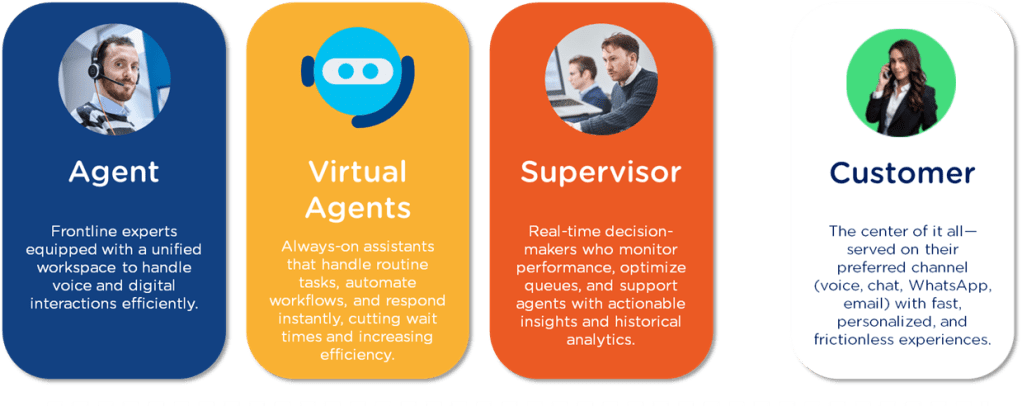
Table of contents
- When does a Microsoft Teams Contact Center Make Sense?
- Microsoft Teams Contact Center Integration Models
- Imagicle Contact Center for Microsoft Teams – Key Features
- Pricing Information
- Imagicle Contact Center vs. Native Microsoft Teams Features
- Conclusion, opinion and summary
- From Italy to the World: Imagicle’s Contact Center Excellence
- Resources
When does a Microsoft Teams Contact Center Make Sense?
I previously explained what a contact center solution is; here’s a brief recap for those who need it. Feel free to move ahead if you’re already familiar with the basics.
Microsoft Teams already offers Auto Attendants and Call Queues – perfect for basic call routing and handling. However, organizations that need advanced routing logic, especially omnichannel engagement, AI-driven assistance, deep analytics, and compliance-grade recording will quickly find these native tools limiting. A certified Microsoft Teams Contact Center becomes valuable when you need to:
- Handle high call volumes with intelligent distribution.
- Integrate voice and digital channels (chat, email, social media, …) in one workspace.
- Provide real-time monitoring and supervisor controls.
- Ensure regulatory compliance for call recording and data handling.
- Reduce agent tool-switching by embedding workflows directly into Teams.
Microsoft Teams Contact Center Integration Models
Not all Microsoft Teams Contact Centers are created equal. Microsoft has defined specific integration models to classify how deeply a contact center solution connects with Teams’ native environment. This classification is important because it determines how seamless the user experience will be for agents, supervisors, and administrators. A deeper integration can mean that agents work entirely within the familiar Teams interface, benefit from single sign‑on, and access advanced features without switching between multiple applications. In contrast, a less integrated solution might rely on external apps or separate logins, which can slow down workflows and reduce adoption. Understanding where a solution fits in these models helps organizations choose the right balance between functionality, user experience, and deployment complexity. Microsoft defines three certified integration models for Contact Centers:
| Integration Model | Description | Typical Use Case |
| Connect | Uses certified SBCs and Direct Routing to connect an external contact center to Teams. | Organizations with an existing CCaaS platform. |
| Extend | Uses Azure bots and Microsoft Graph APIs to extend Teams with advanced features. | Custom workflows, AI bots, CRM integration. |
| Unify | Embeds native Teams experiences directly into the contact center app. | Seamless, single-pane-of-glass agent experience. |
Imagicle’s Contact Center is officially in the Connect category, integrating with Microsoft Teams via Direct Routing and certified SBCs. In parallel, they have long implemented Microsoft Graph APIs and Azure Communication Services (ACS)to deliver advanced capabilities consistent with the Extend model. A prime example of this is Imagicle Attendant Console and Agent Console, presenting a fully ACS-based integration. Moreover, Imagicle is working to obtain the certification for the Unify model.
Imagicle Contact Center for Microsoft Teams – Key Features
Imagicle turns Microsoft Teams into a fully certified, enterprise‑grade contact center, powered by people and AI. It unifies voice and digital channels, adds compliance and AI‑driven automation and self-service, and delivers deep analytics all without forcing agents to leave the Teams environment. Here’s a closer look at what it offers:
- Omnichannel Agent Workspace
Imagicle offers two different agent workspaces to choose from: a lite console integrated into the Teams client to add digital channels to it, and a thick client allowing to manage voice calls, chat, email, SMS, and even social media from a single console
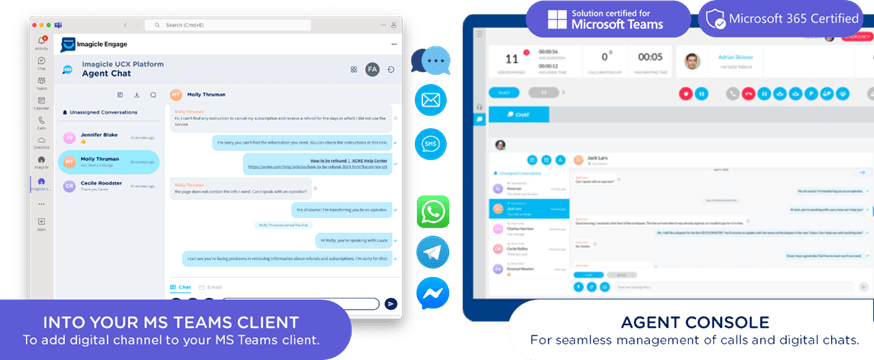
- Capabilities include:
- Answer, transfer (blind or with consultation), park, and retrieve calls
- Queue management
- See real-time Teams presence and calendar availability
- Sign in/out of voice and chat queues; view caller and chat context on arrival
- Handle concurrent chats coming from across channels with one-click actions
- Update call/chat and wrap-up status
- AI assistance and escalation on both call and chat channels for routine questions
- Add internal notes for handoffs and context
- Supervisor workspace: through real-time AI-powered dashboards and wallboards, supervisors have real-time oversight on agent, call, and chat performances. They can use sentiment analysis and transcriptions to uncover actionable insights from voice interactions, track digital conversation volumes and response times, monitor agent performance and queue status live to identify issues and opportunities instantly – all through a unified workspace.
- Advanced Routing
Imagicle helps you go beyond basic call queues, offering organizations AI-assisted routing or the option to start with traditional IVRs and evolve over time. Incoming voice and digital interactions are directed to the right resource based on smart distribution algorithms, and customers can be welcomed through customized greetings or directly by conversational AI. Within their workspace, agents and supervisors see logged-in colleagues and current load, queued, served, and missed items, chat and call counters by queue, and more. - Built‑in AI Assistance
When it comes to AI assistance, Imagicle makes sure every business need is covered with two different solutions for every use case: - AI Virtual Receptionist, built to handle voice-only, front desk tasks (FAQ answering, call transferring, appointment booking) with a pre-configured flow.
- AI Virtual Agents, offering true AI self-service on chat and digital channels through flows built from scratch on a drag&drop, no-code flow editor. They connect to your knowledge base and have deep integration with your CRM, ERP, HR and other systems to offer a personalized experience.
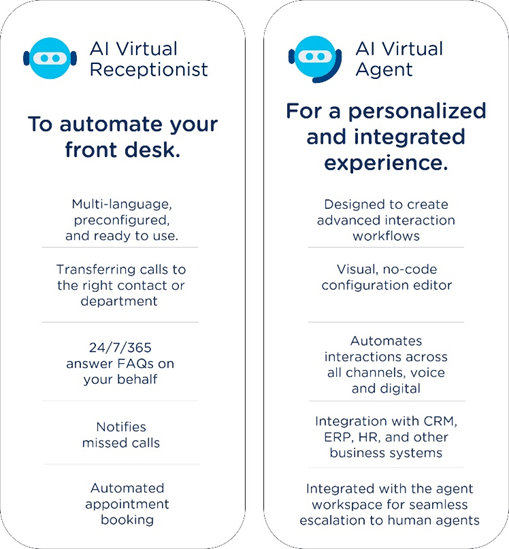
What they have in common is their 24/7/365 availability, the way they bring waiting times to zero, and the way they speak just like a human in 6 different languages (English, Italian, Spanish, German, French, and Arabic).
- Compliance Recording & Voice Analytics
Recording calls doesn’t equal compliance – even though Teams already offers recording capabilities, Imagicle adds the compliance layer that the native feature is missing. Users can record calls directly within Teams, with full compliance to GDPR, HIPAA, PCI‑DSS, MiFID II and more thanks to features such as role-based access, legal hold, configurable retention, tampering detection. While adding compliance, Call Recording powers Voice Analytics: not only can supervisors search, replay, download, or delete recordings and manage access to them, they can also use transcriptions and AI sentiment analysis to assess customer mood, detect keywords, and trigger follow‑up actions.
The Imagicle Contact Center for Microsoft Teams works with Operator Connect, Direct Routing, or Microsoft Calling Plans, so it can fit into virtually any Teams telephony setup.
💡 Why it matters Choosing the right Microsoft Teams Contact Center isn’t just about ticking feature boxes—it’s about ensuring your agents, supervisors, and customers all benefit from a seamless, efficient, and future‑proof experience. Imagicle’s certified solution combines deep Teams integration with omnichannel capabilities, AI‑driven automation, advanced analytics and routing, and compliance‑ready recording, helping organizations handle complex communication needs without leaving the Teams environment. This means faster resolutions, higher customer satisfaction, and a platform that can evolve alongside your business.
Pricing Information
The Imagicle Contact Center offer for Microsoft Teams is available on Microsoft AppSource Marketplace and Azure Marketplace, where you can see plans and pricing.
Imagicle Contact Center vs. Native Microsoft Teams Features
The following comparison provides a high‑level overview of some key differences between Microsoft Teams’ native call handling tools and the Imagicle Contact Center for Microsoft Teams. It is not an exhaustive feature list, and there may be additional nuances or variations – especially as both Microsoft Teams and Imagicle’s solution are continuously evolving. For a precise evaluation, it’s best to engage with a Contact Center consultant who can present, compare, and discuss further capabilities in detail. Ideally, this is done within the framework of a requirements analysis, mapping features directly to your organization’s needs to determine the most suitable approach for your specific environment.
| Feature / Capability | Native Microsoft Teams (Auto Attendants & Call Queues) | Imagicle Contact Center for Microsoft Teams |
| Integration Model | Built‑in Teams features, no external CCaaS integration | Microsoft‑certified Connect model integration, also supporting Microsoft Graph APIs and Azure Communication Services (ACS)to deliver advanced capabilities consistent with the Extend model. |
| Voice Routing | Basic call queues, round robin, longest idle, serial routing | Advanced routing, priority queues, overflow rules, time‑of‑day & holiday routing |
| Omnichannel Support | Voice only | Voice, chat, email, SMS, social media channels in one workspace |
| Agent Workspace | Teams client with basic call controls | Unified console with full call and chat controls or a lite console directly within Teams to handle digital channels only |
| Supervisor Tools | Limited call monitoring | Real‑time wallboards, live monitoring, performance dashboards |
| AI & Automation | None natively for call handling | AI voicebots/chatbots, sentiment analysis, transcription, keyword alerts |
| Compliance Recording | Not included; requires third‑party | Teams‑certified compliance recording (GDPR, HIPAA, PCI‑DSS, MiFID II, and more) |
| Analytics & Reporting | Basic call queue reports | Advanced analytics with historical & real‑time data, agent and queue KPIs |
| Flow Design | Limited to Auto Attendant menus | No‑code visual flow editor for voice & digital channels with Virtual Agents, in-line editor with Virtual Receptionists |
| CRM/ERP Integration | Manual screen‑pops via Power Automate or custom dev | Native connectors for popular CRMs, ERPs, HRs for customer data display and contextualization |
| Scalability | Suitable for small to mid‑size call volumes | Enterprise‑grade scalability with high concurrency support |
| Deployment | Configured entirely in Teams Admin Center | Cloud‑based Imagicle UCX Platform linked to Teams tenant; SSO & Entra ID sync |
Conclusion, opinion and summary
For organizations that have outgrown Microsoft Teams’ native call handling, Imagicle’s certified Contact Center offers a powerful, AI-driven, and fully integrated solution.
By combining omnichannel capabilities, advanced routing, compliance tools, and deep analytics – all within the familiar Teams environment – it enables faster resolutions, happier customers, and more efficient agents.
From Italy to the World: Imagicle’s Contact Center Excellence
Imagicle develops a complete unified portal for AI, UC, digital and collaboration services, designed to enhance team and customer experiences. Its solutions make on-prem, hosted, or cloud calling platforms better places through enhanced security, flexibility, and simplicity. Founded in 2010 and part of the Zucchetti Group, Imagicle has grown into a global presence with over 130 professionals across seven offices in Italy, France, the United States, and the Middle East, working everyday to make customers happy.






 erik365.blog
Comment / Kommentar verfassen