
Have you ever wondered how to cope with calls in Call Queues if there is no agent signed in? Well, there is another option now available which enables you for building smoother call flows in Microsoft Teams. The following screenshots will show you what’s new and what can be configured.


This section with “No Agents Opted/Logged In” is new (July 28, 2023).

As you can see here, there are four settings available. First of all, you can decide if the setting should only be applied for new incoming calls (or all calls/callers in the queue).
The next thing you can configure is what you would like to happen if there is no agent online (available to be called/opted in the queue) for this queue. Well, “Disconnect” is the worst you could do for a smooth call flow (if the call flow’s termination/end is not reached), and queuing “Queue call” is the default, so that’s why there is “Redirect call to“.
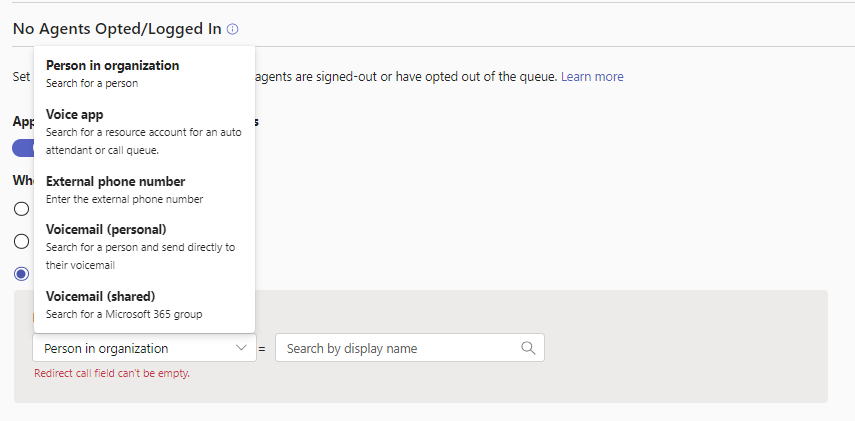
“Redirect call to” should be the way to go and that’s where you can define what should happen in case. So there you’ve got the common and known options available to forward it to “Person in organization“, “Voice app“, “External phone number“, “Voicemail (personal)” or “Voicemail (shared)“.
Conclusion, opinion and summary
Alright, that’s pretty nice! It can help in certain situations to leave no caller behind if (suddenly) agents are opting out for receiving calls or are not logged in anymore. To me this is defintly going to be a standard I’ll direct leverage in my Teams telephony projects with call queues.
Resources
- Create a Call queue in Microsoft Teams – Microsoft Teams | Microsoft Learn
- Jamie Stark auf Twitter: „Hey there #MicrosoftTeams Phone Admins! There’s a _both_ a new feature in Call Queues to handle “No agent” scenarios and a new callout in TAC to make you aware of it! Check out more on No Agent configs here: https://t.co/WQwbwDK9wB https://t.co/XeJcNTG0D0“ / X







 erik365.blog
Leave a reply to Jeroen van Dongen Cancel reply