
If you work with multiple organizations that use Microsoft 365 with Teams, you might wonder how you can collaborate across tenants. In this blog post, we will explore some of the options that are available today for cross-tenant collaboration, and how they could help you achieve your business goals.

At this point I want to note that this is an evolving topic and is subject to change. In 2023 we saw several feature adds, changes and news influencing today's options to collaborate across multiple Microsoft 365 tenants. In this post I will provide an overview on the common options.
- Option 1: Microsoft 365 guest access
- Option 2: Teams External access (federation)
- Option 3: SharePoint Online / OneDrive external sharing
- Option 4: Teams Shared Channels (Direct Connect)
- Option 5: Exchange Online calendar sharing
- Are there more in-depth Microsoft 365 cross-tenant collaboration options available?
- Option 6: Entra ID B2B cross-tenant sync
- Conclusion, opinion and summary
- Resources
Option 1: Microsoft 365 guest access
One option is to use guest access in Microsoft Teams. This allows you to invite external users to join your team in Teams as guests, and give them access to chat, meetings, files, and apps. Guest access is ideal for scenarios where you need to work closely with external partners on a specific project or topic. You can manage guest access at the tenant, team, and channel level, and apply policies and settings to control the guest experience.
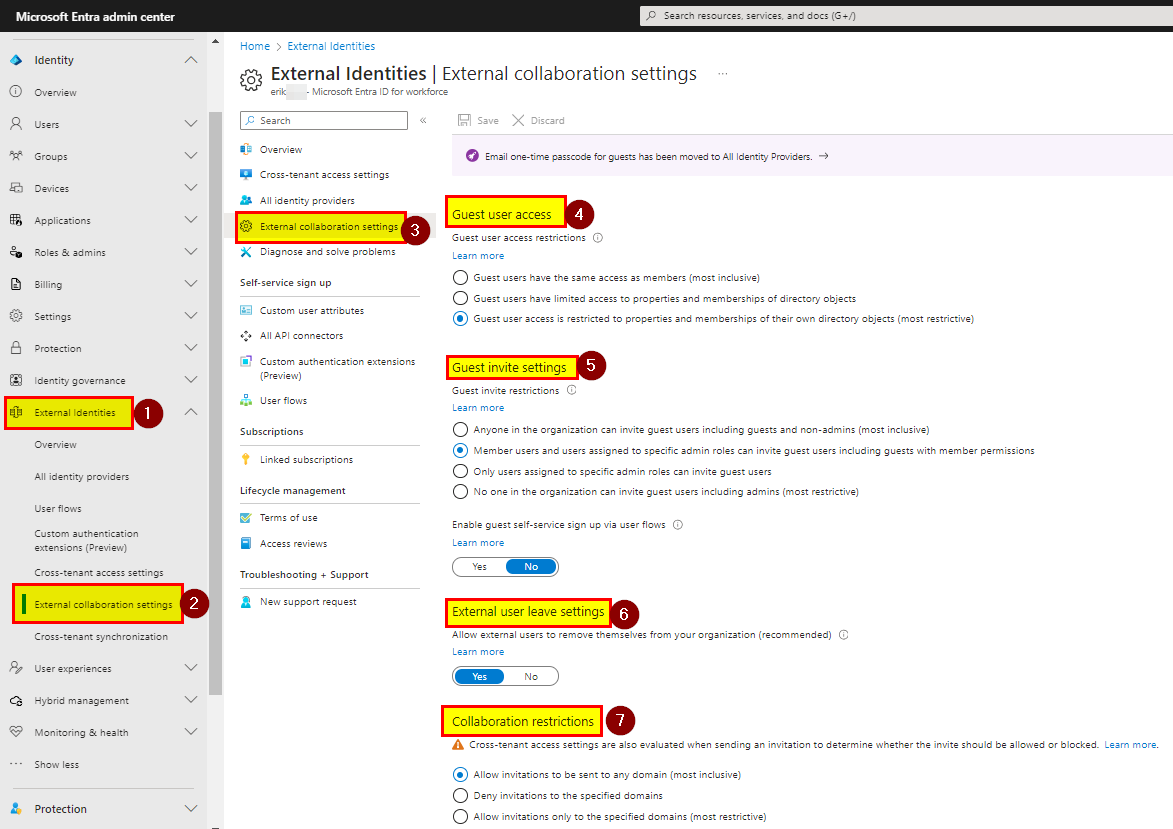
Guest access is configured in Entra ID/Microsoft 365 as well as in Microsoft Teams. In Entra ID the external collaboration settings must be configured as required.
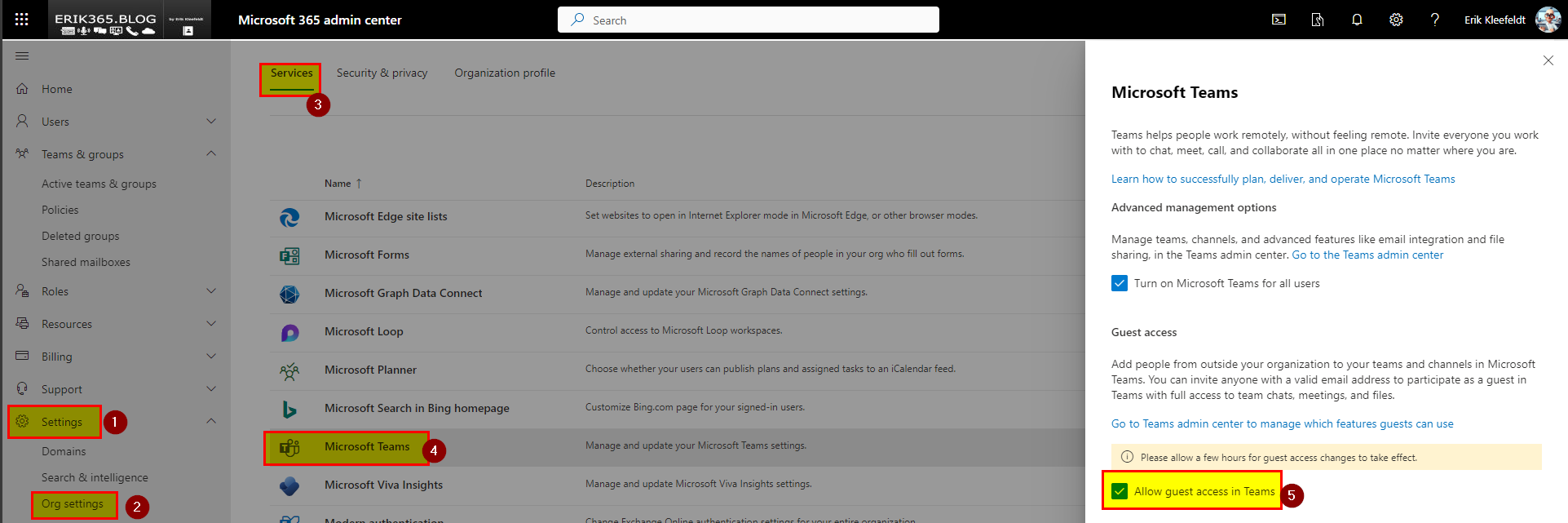
In the Microsoft 365 admin center there is a “big” switch to enable or disable guest access for Microsoft Teams.
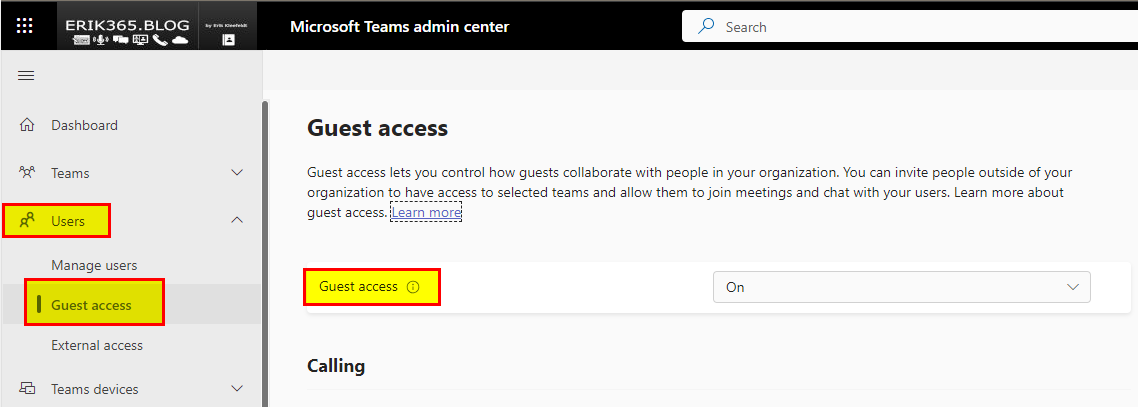
To configure more and fine-tune guest access for Teams, there are some more granular settings in the Teams Admin Center.
Option 2: Teams External access (federation)
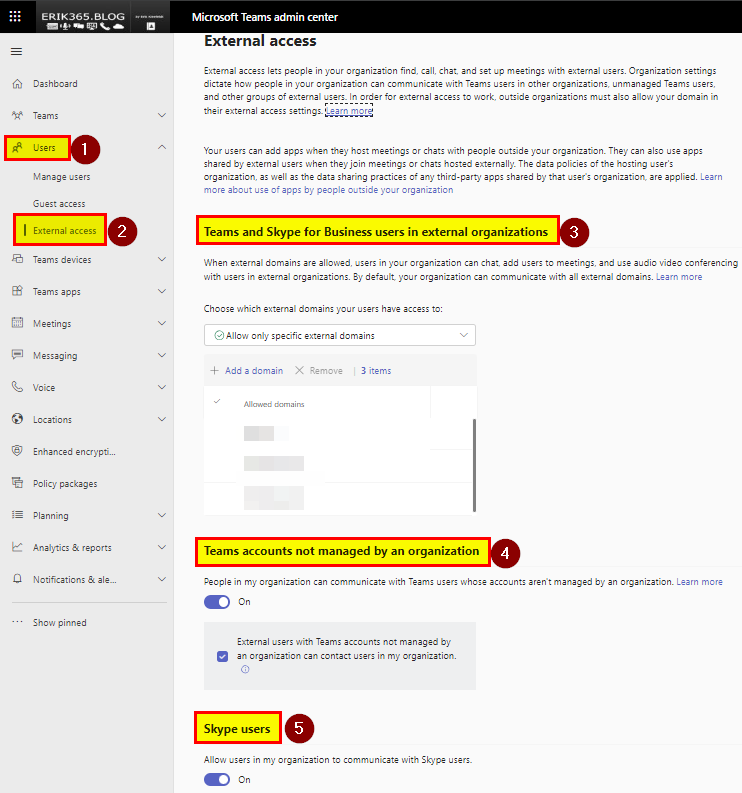
Another option is to use external access (federation) in Microsoft Teams. I do not really like the feature name “external access” because it suggests more as it actually is, in my opinion. However, this allows you to communicate with external users who are using Teams (or Skype for Business) in other organizations. External access is ideal for scenarios where you need to have one-to-one chats, group chat (not SFB) or calls with external contacts, without inviting them to your tenant and team. You can manage external access at the tenant level, and choose which domains you want to allow or block.
Option 3: SharePoint Online / OneDrive external sharing
A third option is to use SharePoint Online external sharing. This allows you to share files, folders, sites, and lists with external users who have a Microsoft account or an email address. SharePoint Online external sharing is ideal for scenarios where you need to share documents or resources with external partners, without giving them access to your team. You can manage SharePoint Online external sharing at the tenant, site collection, site, and item level, and apply settings and permissions to control the sharing experience.
Like Teams guess access you find a “big” switch in the Microsoft 365 admin center.
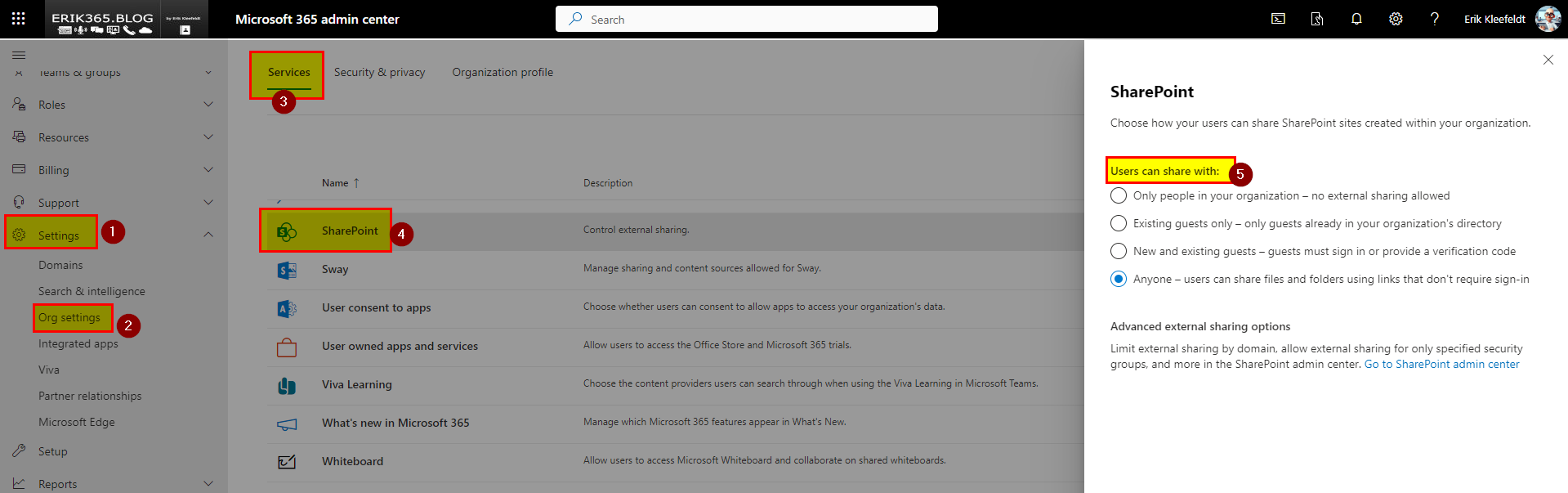
For a bit more granular set up you can go to the SharePoint Online admin center.
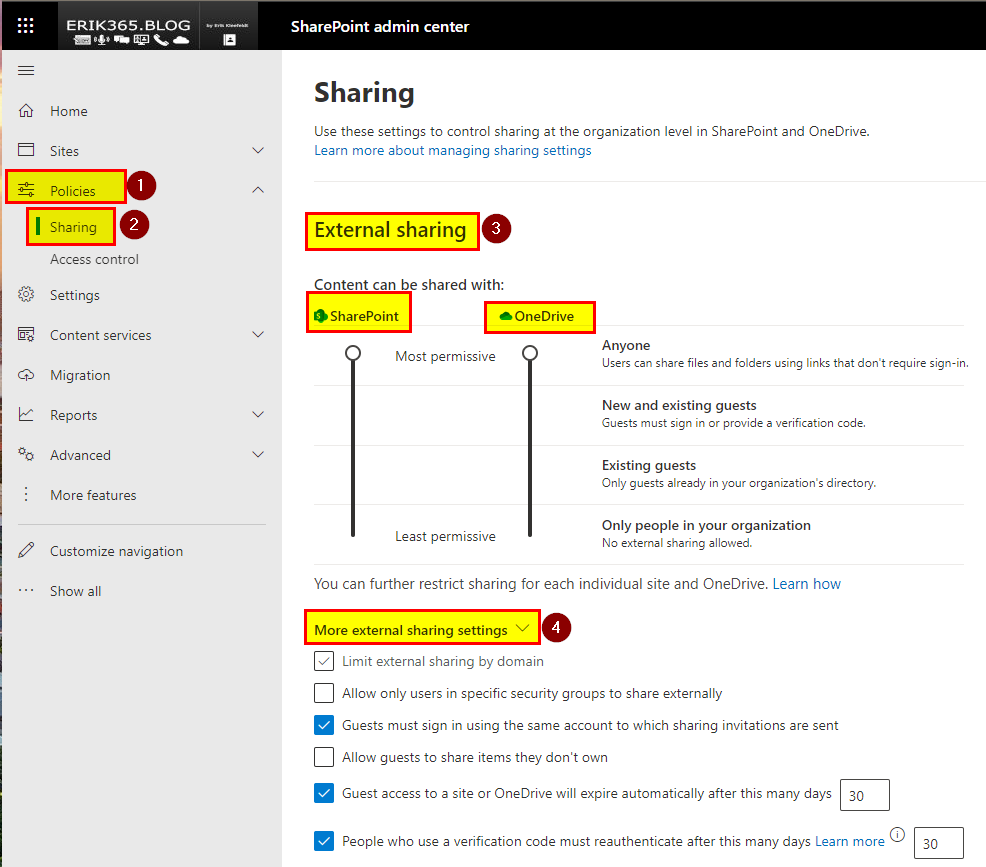
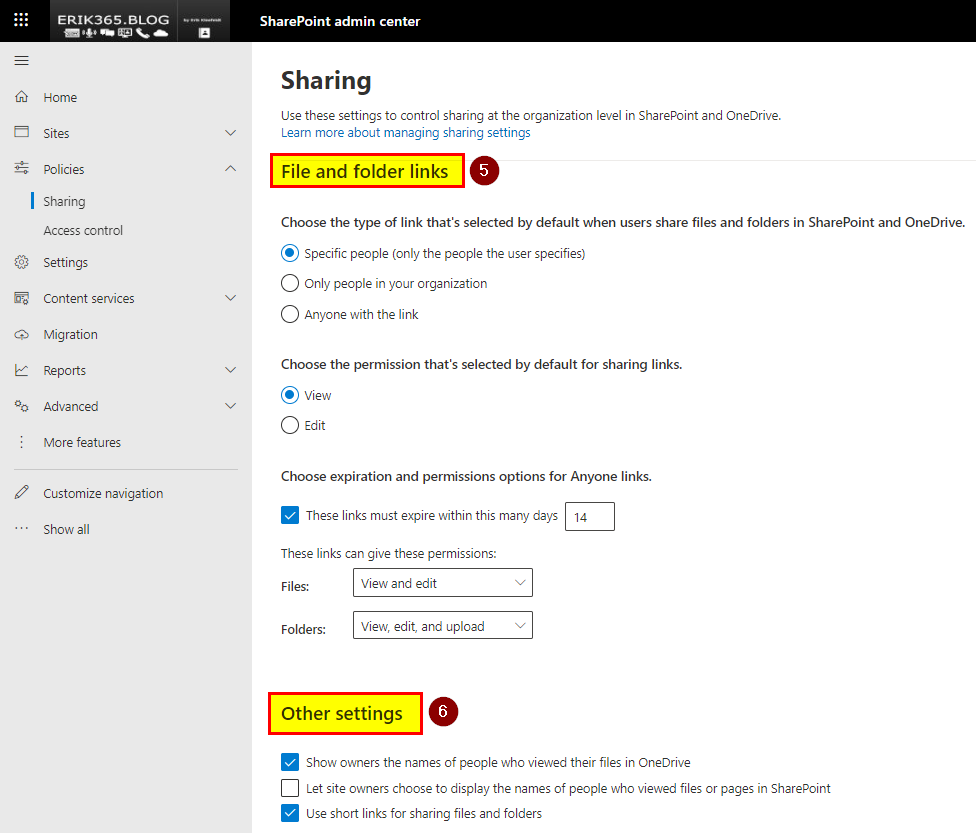
And if that’s not enough you need to go ahead with PowerShell.
Option 4: Teams Shared Channels (Direct Connect)
With Microsoft Teams Direct Connect, users from e.g. two organizations can collaborate with their home credentials and a shared channel in Teams without having to be added as guests to the respective organizations. You can use Microsoft Teams Direct Connect to share resources with external Microsoft Entra organizations. Or you can use it to share resources across multiple Microsoft Entra tenants within your own organization.
Microsoft Teams Direct Connect is a feature of Microsoft Entra External ID that allows you to establish a mutual trust relationship with another Microsoft Entra organization for seamless collaboration. This feature currently works with shared channels in Teams. Both, the resource organization and the external organization must mutually enable Microsoft Teams Direct Connect.
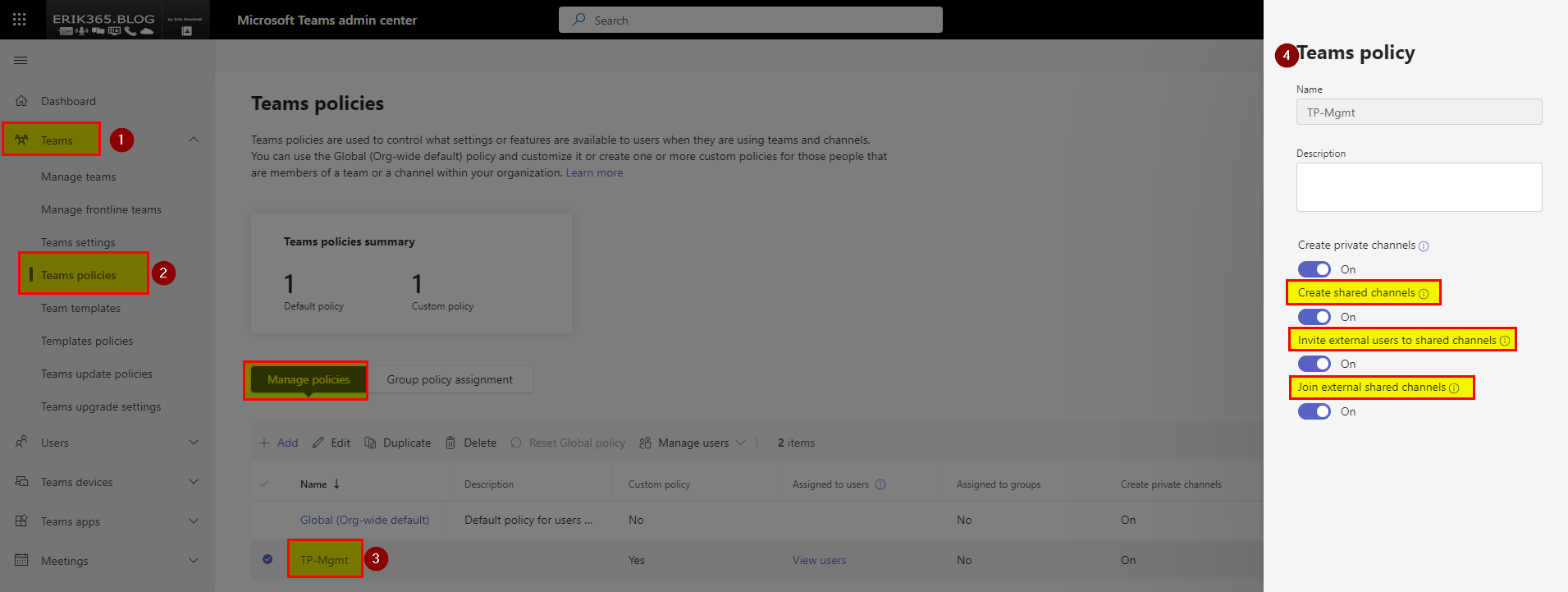
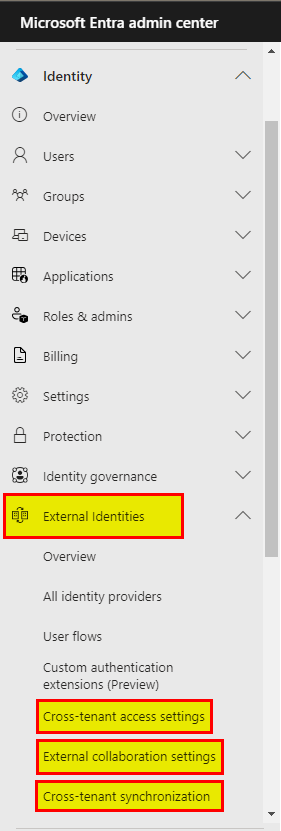
To go with Teams Shared Channels internally and externally you have to configure a mutual Entra ID trust relationship and the Teams policies. On Entra ID cross-tenant access settings must be configured by adding a trustworthy organization (relationship) on both ends. In each Entra ID tenant and organization which wants to use Teams Shared Channels, the configuration is required.
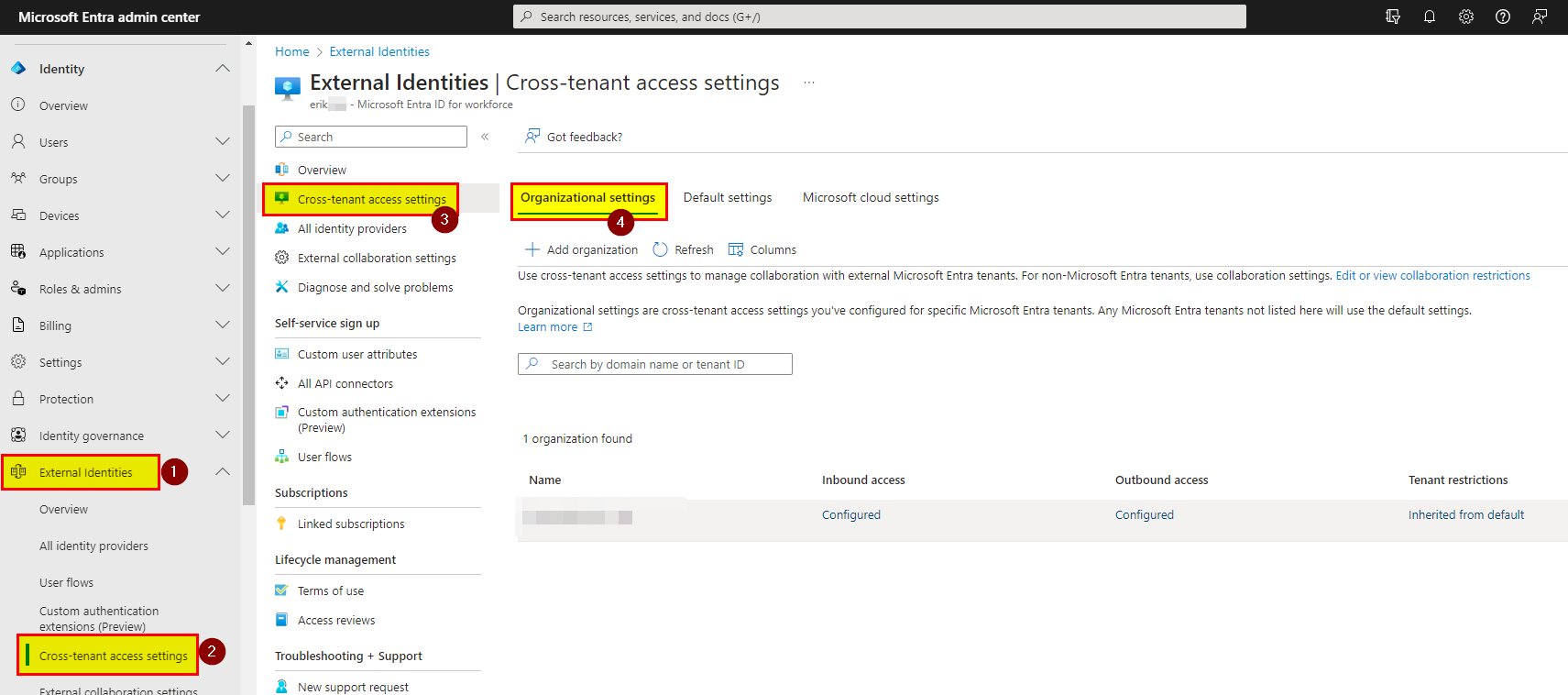
The Teams policies must be configured to enable shared channels, externally.
Option 5: Exchange Online calendar sharing
I want to add this as well, although this no direct Teams collaboration feature across multiple Microsoft 365 tenants. Free/busy calendar sharing enables users across multiple Microsoft 365 tenants to lookup calendars of each other, for example to view availability and/or schedule appointments easier. This is in my option beneficial to accomplish a more efficient cross-tenant scheduling, although therefore are also options available like FindTime or Bookings.

Are there more in-depth Microsoft 365 cross-tenant collaboration options available?
For a more in-depth integration and collaboration there is a further option available. This more suited for intra-organization collaboration. In other words for a group of companies belonging together in certain way but each one having its own Microsoft 365 tenant due to legal, regulatory, compliance or other reasons.
I had the chance to configure this already a few times that’s why I would say that these are not very complicated to be implemented. But if you go down that path you might need to clarify a lot of things previously especially regarding security for identities, devices and data. If done wrong it has the potential to become a (big) mess in many aspects. A thorough understanding of the current service is a must. IT admins and users should be able to react quickly to changes which might occur because Microsoft 365 and related services are steadily under change (feature add, change, deprecation/removal).
Option 6: Entra ID B2B cross-tenant sync
Entra ID (previously Azure AD) cross-tenant sync is a feature that enables you to synchronize identities (users) across different tenants. This means that if a user from one tenant is accessing the another, their Entra ID will remain the same and their identity will be consistent.

This also means that if you update the Entra ID attributes of a user in one tenant, such as their name, email, or phone number, the changes will be reflected in the other tenants as well. The behavior in Microsoft Teams is similar to option 1 (guest access) but not alike. A cross-tenant synced users has the Entra ID attribute user type “member” and not “guest” which is completely different. A member is common user which means that it can be also owner of a team in Teams etc. And this works not just with Microsoft Teams, this works for Microsoft 365 and non-Microsoft 365 apps which are attached to your Microsoft Entra ID (tenant). This ideal for companies having multiple Microsoft 365 tenants and requirements to collaborate with Microsoft Teams but not only.
Conclusion, opinion and summary
These are some of the cross-tenant collaboration options that are available today in Microsoft 365 and Entra ID. Depending on your needs and preferences, you can choose the option that best suits your scenario. It is also possible to mix the collaboration option to a certain extent but it should be done wisely.
Not to forget, to stay compliant and secure you might consider to implement a proper identity and data governance. Either based on Entra ID, Microsoft 365 or a third-party solution.
Please also keep in mind to re-read the documentation from time to time and monitor your Microsoft 365 message center notifications because the cross-tenant features are evolving.
Resources
- Use guest access and external access to collaborate with people outside your organization – Microsoft Teams | Microsoft Learn
- Guest access in Microsoft Teams – Microsoft Teams | Microsoft Learn
- Overview of external collaboration options in Microsoft 365 (IT admins) – Microsoft 365 Enterprise | Microsoft Learn
- Multitenant organization scenario and Microsoft Entra capabilities – Microsoft Entra ID | Microsoft Learn
- What is a multitenant organization in Microsoft Entra ID? (Preview) – Microsoft Entra ID | Microsoft Learn
- What is a cross-tenant synchronization in Microsoft Entra ID? – Microsoft Entra ID | Microsoft Learn
- Topologies for cross-tenant synchronization – Microsoft Entra ID | Microsoft Learn
- Plan for multitenant organizations in Microsoft 365 (Preview) – Microsoft 365 Enterprise | Microsoft Learn
- What’s Azure Active Directory cross-tenant synchronization? – erik365.blog







 erik365.blog
Comment / Kommentar verfassen