
Microsoft is continuing its push to bring intelligent automation into everyday collaboration. A new feature, AI Workflows in the Microsoft Teams Workflows app, is set to roll out between late 2025 and early 2026 for general availability based on the Message Center ID MC1147389 and Roadmap ID 500379. For targeted releases the rollout might be completed which rolled out from September to early October 2025.

What’s new?
AI Workflows leverage Microsoft 365 Copilot to help users automate repetitive tasks through scheduled prompts and ready-to-use templates. Instead of manually setting up complex flows, employees will be able to select from predefined Copilot-powered templates that streamline daily tasks, e.g. sending reminders, updating project boards, or generating reports.

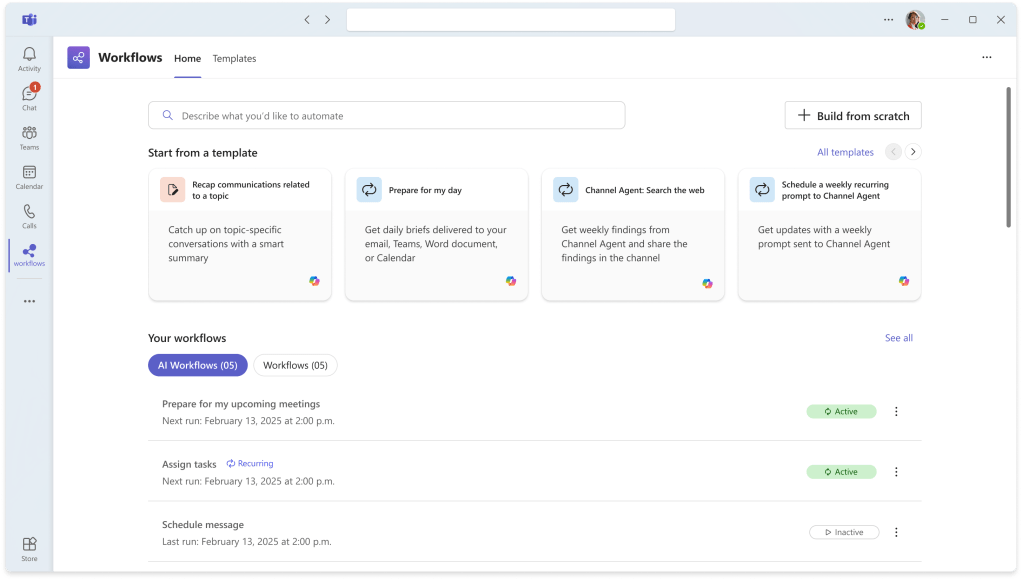
Source: Microsoft 365 Message Center ID MC1147389
Requirements
What is required to use AI-powered Workflows in Microsoft Teams?
- Microsoft 365 Copilot license
- Teams Workflows app (desktop, web, and Mac)
- When?
- Targeted release availabilty proably starting between September and early October 2025
- General availability (GA) early 2026
- Default setting: The feature is off by default. Organizations must enable the Workflows app in Teams for users to access it.
How to control it as admin?
Microsoft 365 / Teams administrators retain full control:
- They can enable or disable the Workflows app at the tenant level.
- If desired, admins can use Cloud Policy to block “optional connected experiences,” which also disables Copilot’s scheduled prompts.
- This ensures organizations can balance productivity gains with compliance and governance requirements.
Why It Matters
The introduction of AI Workflows is part of Microsoft’s broader strategy to embed Copilot into the flow of work. For organizations, this means:
- Time savings: Automating routine tasks frees employees to focus on higher-value work.
- Consistency: Templates reduce errors and ensure standardized processes.
- Scalability: Teams of all sizes can benefit from automation without needing advanced technical skills.
What You Can Do to Prepare?
- Admins: Review your Teams app policies and decide whether to enable the Workflows app.
- Users: Familiarize yourself with Copilot’s capabilities and explore how scheduled prompts could simplify your daily tasks.
- Leaders: Consider how AI-driven automation aligns with your digital workplace strategy for 2026 and beyond.
Conclusion, opinion and summary
AI Workflows in Teams mark another step toward a more automated, intelligent workplace. By combining Copilot’s generative AI with Teams’ collaboration hub, Microsoft is giving organizations a powerful tool to streamline operations while leaving admins in control of adoption.






Comment / Kommentar verfassen