In this post I like to write about how you can manage Microsoft Exchange attributes while still maintaining a local Windows Server Active Directory but not using Exchange attribute writeback and going to get rid of the last Exchange Server. This is just an part of the journey to move cloud native from an hybrid deployment (AD, Exchange).
The goal is to provide a overview for administrators planning to work in environments without an Exchange Server for managing mail-related attributes stored in AD users due to a previouse migration to Exchange Online.
You also should be aware of that there is a attribute writeback through Entra Cloud Sync possible but I will not describe this in this post.
Table of contents
- Introduction
- Initial Situation
- How to create a new user mailbox?
- How to create a new resource mailbox?
- Conclusion, opinion and summary
- Resources
Introduction
In environments where user identities are still managed through a local Windows Server Active Directory, but Exchange recipient management should take place online (Exchange Online) new options were annoucent mid 2025 and could be used.
So if you move Exchange attribute management from local, on-premises Exchange Server to Exchange Online, the mailbox provisioning follows a different operational model than in (classic) hybrid deployments with at least one Exchange Management Server remaining. Switching Exchange Online to the authoritative source (SOA) for Exchange attributes is a step to decommission the last on-premises Exchange Server clean.
I do not like to just shut it down the supported way, use Exchange management tools elsewhere and leave references in Active Directory. This feels not alright, leaving it like that. So, I’m glad about the new options.
However, let’s talk about what if you want to switch to managing Exchange attributes online after having migrated all mailboxes to Exchange Online etc. Well, organizations need clear and reliable processes for creating user mailboxes, shared mailboxes, and equipment mailboxes.
Initial Situation
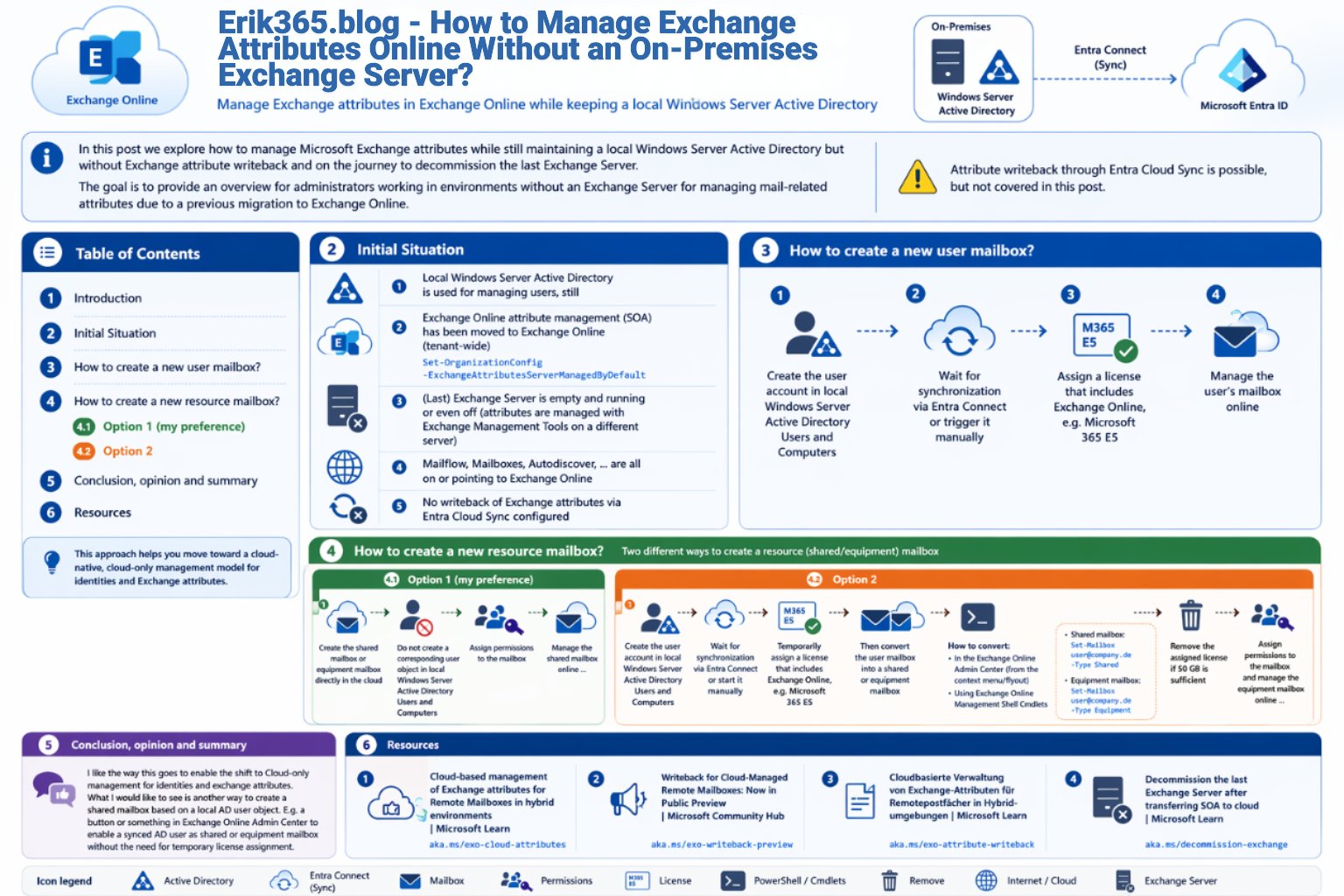
- Local Windows Server Active Directory is used for managing users, still
- Exchange Online attribute management (SOA) has been moved to Exchange Online (tenant-wide)
(Set-OrganizationConfig -ExchangeAttributesServerManagedByDefault) - (Last) Exchange Server is empty and running or even off (attributes are managed with Exchange Management Tools on a different server)
- Mailflow, Mailboxes, Autodiscover, … are all on or pointing to Exchange Online
- No writeback of Exchange attributes via Entra Cloud Sync configured
How to create a new user mailbox?
- Create the user account in local Windows Server Active Directory Users and Computers
- Wait for synchronization via Entra Connect or trigger it manually
- Assign a license that includes Exchange Online, e.g. Microsoft 365 E5
- Manage the user’s mailbox online
How to create a new resource mailbox?
In this scenario, there are two different ways to create a resource (shared/equpiment) mailbox:
Option 1 (my preference)
- Create the shared mailbox or equipment mailbox directly in the cloud
- Do not create a corresponding user object in local Windows Server Active Directory Users and Computers
- Assign permissions to the mailbox
- Manage the shared mailbox online …
Option 2
- Create the user account in local Windows Server Active Directory Users and Computers
- Wait for synchronization via Entra Connect or start it manually
- Temporarily assign a license that includes Exchange Online, e.g. Microsoft 365 E5
- Then convert the user mailbox into a shared mailbox or an equipment mailbox
- In the Exchange Online Admin Center (from the context menu/flyout of the respective mailbox)
- Using Exchange Online Management Shell cmdlets
- Shared mailbox:
Set-Mailbox user@company.de -Type Shared - Equipment mailbox:
Set-Mailbox user@company.de -Type Equipment
- Shared mailbox:
- Remove the assigned license if 50 GB is sufficient
- Assign permissions to the mailbox
- Manage the resource mailbox online …
Conclusion, opinion and summary
I like the way this evolves to enable the shift to Cloud-only management for identities and exchange attributes. However, what I would like to see is another way to create a shared mailbox based on a local AD user object. E.g. a button or something in Exchange Online Admin Center to enable a synced AD user as shared or equipment mailbox without the need for temporary license assignment.
Resources
- Cloud-based management of Exchange attributes for Remote Mailboxes in hybrid environments | Microsoft Learn
- Writeback for Cloud-Managed Remote Mailboxes: Now in Public Preview | Microsoft Community Hub
- Cloudbasierte Verwaltung von Exchange-Attributen für Remotepostfächer in Hybridumgebungen | Microsoft Learn
- Decommission the last Exchange Server after transferring SOA to cloud | Microsoft Learn




Comment / Kommentar verfassen