Make an outbound call using another phone number with Microsoft Teams

In this post I describe a recent Teams calling update which enables users to dynamically decide and make outbound calls with another phone number. The feature just showed up in my Microsoft Teams App for Windows. In May 2022 I already wrote another post that this feature is on the roadmap.

Source: https://pixabay.com/de/photos/telefon-alt-baujahr-1955-bakelit-3594206/

Background

By default you can only assign one phone number to an enterprise voice enabled user in Microsoft Teams. If a user must suppress his number (DID) a Teams Admin can assign a Caller ID Policy but that’s static.

Using collaborative calling in a Teams channel already allowed to make outbound calls with another phone number but this had some other tradeoffs, e.g. calls could not be received from all Teams clients like Teams on the web or on the mobile.

How to call out with another phone number in Microsoft Teams?

Today, if you are member (agent) of a Teams Call Queue you can make an outbound call dynamically. To call out using another number do the following:

  • Open the Teams call toast
  • Enter a phone number you would like to call
  • Click on the drop-down on the right besides the call button
  • Click with which number you want to call out
  • That’s it!
Source: Screenshot Microsoft Teams App on Windows July 2th, 2022

Notes for Teams admins

That it works the user must be member of a Teams Call Queue (CQ).

Furthermore in the Teams CQ a Teams resource account must be added.
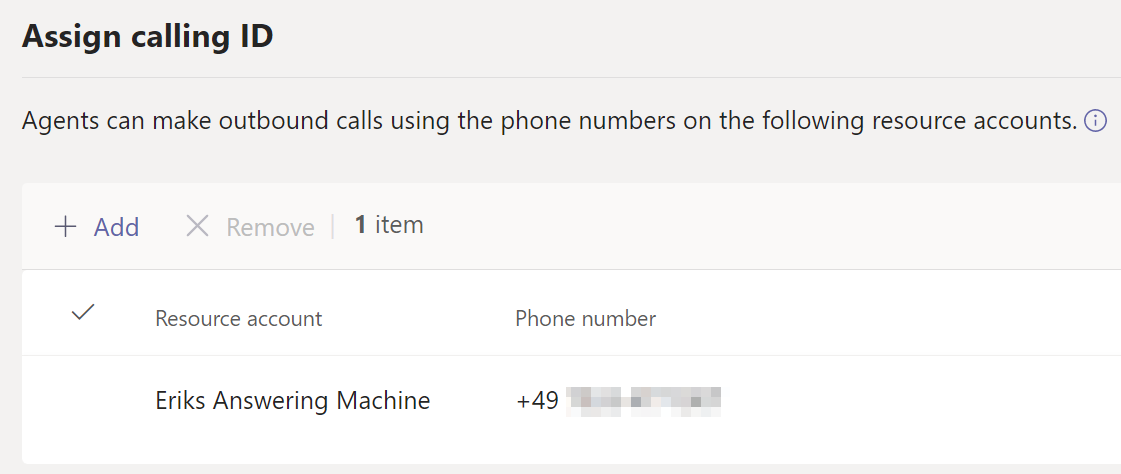
Source: Screenshot Microsoft Teams Admin Center \ Call Queue \ Assign calling ID

Depending on your Teams calling deployment (calling plans, direct routing, operator connect) the Teams Resource Account must be able to make an outbound call. In case of direct routing you need to assign the suited Teams Online Voice Routing policy. For calling plans you need to assign calling plans (plus communication credits).

Additional resources


Discover more from erik365.blog

Subscribe to get the latest posts sent to your email.

9 responses to “Make an outbound call using another phone number with Microsoft Teams”

  1. Upcoming change on required permissions to create and manage Teams resource accounts – erik365.blog Avatar

    […] Make an outbound call using another phone number with Microsoft Teams – erik365.blog […]

    Like

  2. martin heusser (@mozzeph) Avatar

    Hi Erik, thanks for the nice summary. Something to keep in mind: when you use Users, Groups or both instead of a Team/Channel to add the agents to the queue, the additional Calling Line ID will still show up in the Calls App / DialPad. However, in my tests, using it for outbound calls did not work unless you configure a Team/Channel as Agent List.

    Also, that’s the second time I read somewhere that using collaborative calling would only deliver calls to the Teams Desktop Apps. Where did you get this info from? It doesn’t matter which method you chose, Team/Channel, Users, Group or Group and Users, in the end, Teams will expand the Team and all Enterprise Voice Enabled users to the CQ “internal” AgentList. Agents will still receive calls on Mobile, Web, Desk Phones even when Voice Enabled Channels are used. Users can still Opt-In/Out from CC Queues through Settings when using the Mobile, Web or Desk Phone Apps. Only the Calls Tab inside the Channel is not visible on devices other than Desktop. On Mobile, additional Calling Line IDs have been available through the Calls App before it was rolled out on Desktop.
    More info about CQ Agent Lists here: https://medium.com/@mozzeph/microsoft-teams-call-queue-agent-lists-and-how-to-force-sync-them-ef8092090df0

    Like

    1. Erik Avatar

      Hi Martin,
      Thank you for your comment.

      That’s an interesting point in my tests above agents where direct CQ members (added as users). I could change it to a collab calling channel and back, just to see if it makes any difference that the CQ object gets updated.

      Regarding the collab calling there is a compat. list by Microsoft docs (link below) showing that it is only supported/working Windows, Mac and VDI clients. I tested this in an early stage in March 2021. Maybe this is no longer up-to-date?

      See https://docs.microsoft.com/en-us/microsoftteams/create-a-phone-system-call-queue?tabs=general-info#call-queue-feature-compatibility

      See also https://erik365.blog/2021/03/25/calling-gets-integrated-into-channels-within-teams-in-microsoft-teams/

      Like

      1. martin heusser (@mozzeph) Avatar

        Hi Erik,

        I noticed the first point because I wanted to set it up for a customer and I couldn’t get it to work without using CC assignments.

        Ah I see, I also saw that compat list. I think they just mean that the Calls Tab within the channel is not supported on Mobile, Web, Ip Phones etc. We use a CC Queue in Production and I’m 100% sure that calls from a CC queue can be received on mobile because I answer a lot of them on mobile.

        I just wanted to ask why you thought that calls from CC queues only hit desktop users but now it’s clear.

        Like

        1. Erik Avatar

          Hi Martin,
          Thank you for your feedback.

          I made some further tests in my lab. 😀
          Making outbound calls worked in both scenarios, i.e. (test 1) agents added directly in a CQ and (test 2) agents being part of a Teams channel. What I did not test is if there is a difference adding users in group to a CQ.

          Moreover, I tried calling a CC with Teams mobile app users-only. It worked (on iOS). I’m excited about this. 🙂 However, I will still be cautious because I’m not sure if this is or could be subject to change? I might just open a request via Git to update the documentation.

          Like

          1. Frank ter Beek Avatar
            Frank ter Beek

            I want to use this option too, but I noticed that if I have an autoattendant using an AA-resource with number +3120xxxxxxx (the number of our servicedesk) and I want to assign that same resource to the queue with agents so they can use that number to dial out, it won’t let me because ‘resource is already in use’. Also cannot make a CQ-resource with that number because ‘number is already in use’. Looks like I’m stuck with the CallerIdPolicy and force the outgoing number that way…..any thoughts ?

            Like

          2. Erik Avatar

            I came across something these days.

            I think there is/was an issue in the backend. You might re-check if this works by now. Check out these two resources:

            Twitter thread: https://twitter.com/lcansby/status/1560362857853861893?s=21&t=QaVQ-qL-dr9iZjXz-c_rsw

            Blog post from Linus Cansby: und https://www.lync.se/2022/08/resource-account-already-associated-with-auto-attendant/

            Like

          3. Frank ter Beek Avatar
            Frank ter Beek

            unfortunately, still get the error that I cannot assign the RA of the AA to the CQ.

            Like

          4. Erik Avatar

            Has the AA‘s RA a voice routing policy assigned (direct routing)? If that’s not going to make a difference I‘d give it a try with another RA/AA/CQ to test if it occurs only with the existing one or others as well. At last you might raise a Microsoft support ticket.

            Like

Leave a reply to Upcoming change on required permissions to create and manage Teams resource accounts – erik365.blog Cancel reply

I’m Erik

Welcome to Erik’s blog, your go-to space for curated updates and insights on Microsoft Teams, Copilot, and Microsoft 365. Join me as we explore the latest developments, share valuable information, and spread knowledge. This blog not only serves as a source of news but also as my personal collection of notes, openly shared with you all. Let’s elevate teamwork and productivity together!

Let’s connect





