
In this post I describe a recent Teams calling update which enables users to dynamically decide and make outbound calls with another phone number. The feature just showed up in my Microsoft Teams App for Windows. In May 2022 I already wrote another post that this feature is on the roadmap.

Background
By default you can only assign one phone number to an enterprise voice enabled user in Microsoft Teams. If a user must suppress his number (DID) a Teams Admin can assign a Caller ID Policy but that’s static.
Using collaborative calling in a Teams channel already allowed to make outbound calls with another phone number but this had some other tradeoffs, e.g. calls could not be received from all Teams clients like Teams on the web or on the mobile.
How to call out with another phone number in Microsoft Teams?
Today, if you are member (agent) of a Teams Call Queue you can make an outbound call dynamically. To call out using another number do the following:
- Open the Teams call toast
- Enter a phone number you would like to call
- Click on the drop-down on the right besides the call button
- Click with which number you want to call out
- That’s it!

Notes for Teams admins
That it works the user must be member of a Teams Call Queue (CQ).
Furthermore in the Teams CQ a Teams resource account must be added.
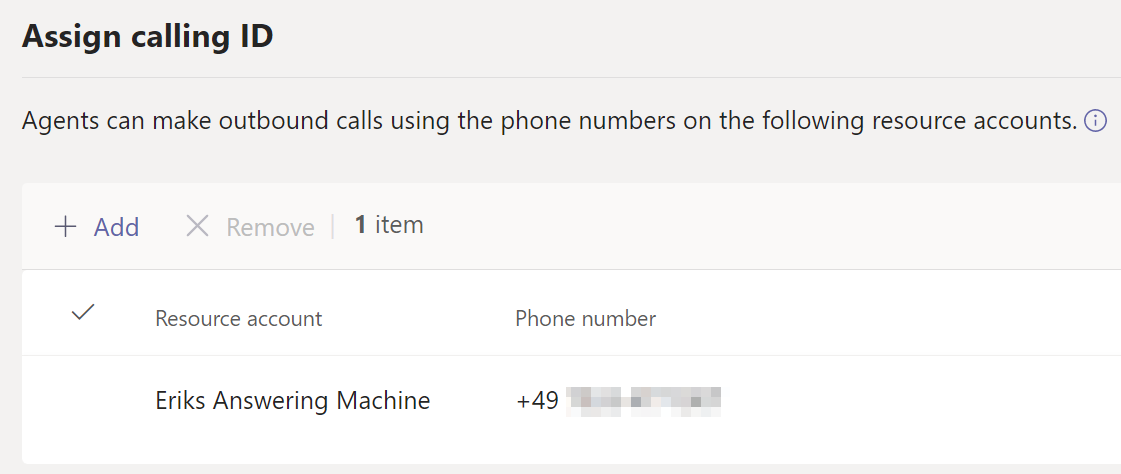
Depending on your Teams calling deployment (calling plans, direct routing, operator connect) the Teams Resource Account must be able to make an outbound call. In case of direct routing you need to assign the suited Teams Online Voice Routing policy. For calling plans you need to assign calling plans (plus communication credits).
Additional resources
- Make an outbound call with different phone number in Microsoft Teams – erik365.blog
- Enable resource account for outbound call in Microsoft Teams Call Queues and Auto Attendants – erik365.blog







 erik365.blog
Leave a reply to Erik Cancel reply