This post highlights a new calling capabilitiy for Microsoft Teams, voice-enabled channels. The feature’s release is planned for this month, March 2021.

Source: https://pixabay.com/de/photos/telefon-alt-baujahr-1955-bakelit-3594206/

What are Teams voice-enabled channels?

As the roadmap and information from the last Microsoft Ignite states so far: it enables channels in a Teams Team to receive incoming calls from PSTN via a Teams call queue. Today, you have to add agents or a group of agents to a Teams call queue, that they can receive calls. By voice-enabled channels you can create new channels, enable them for voice and than configure a call queue to route these calls into this voice-enabled channel.

This can be helpful for more collaborative telephony especially in Teams where the might have a need to quickly communicate via chat before, during and after a call received from PSTN.
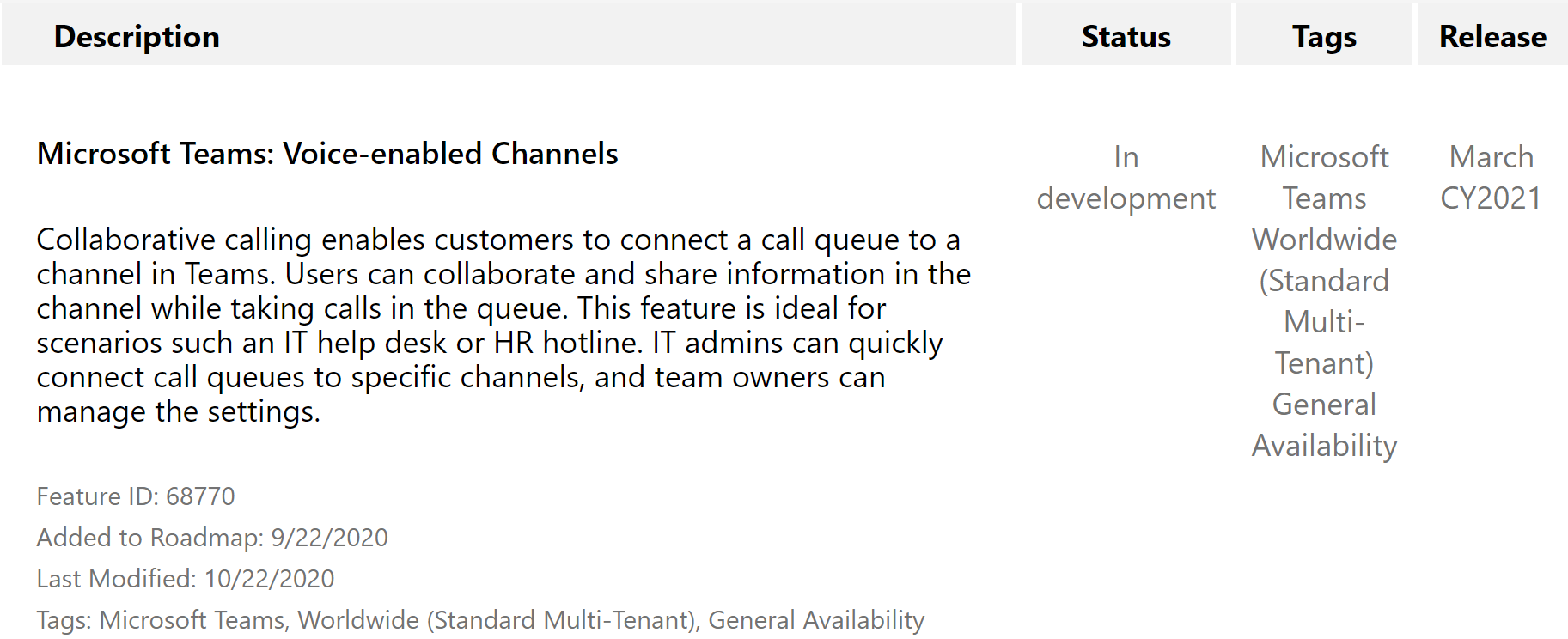
Source: Microsoft 365 Roadmap Feature ID 68770

Update 2021-04-01 – Configuration

Yesterday, 2021-03-31 it showed up in my tenant. You can configure voice-enabled channels easily either with an existing or new Team’s channel. The follow shows you on a high level how to configure voice-enabled channels in Teams?

Teams Admin Center (TAC)
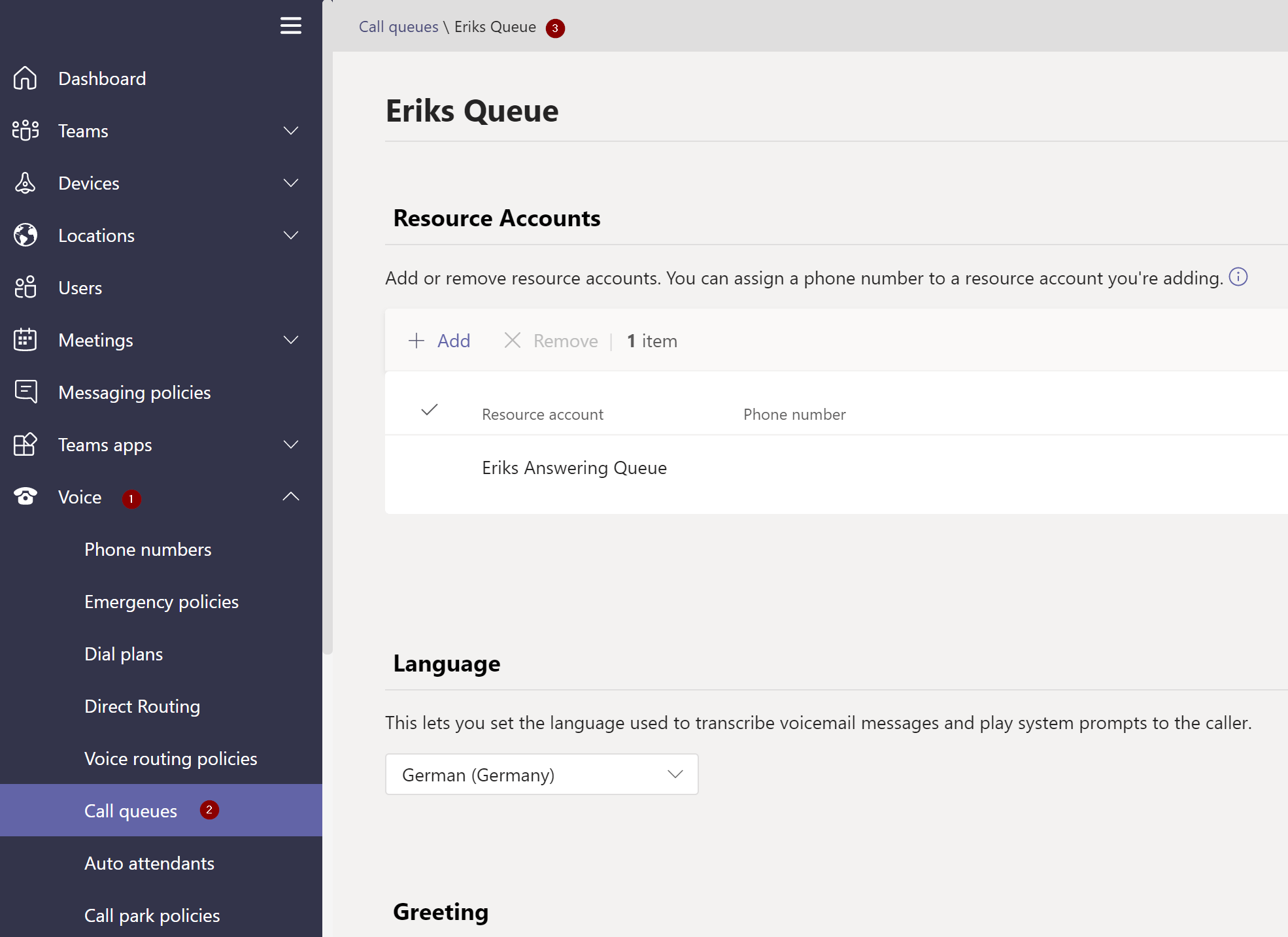
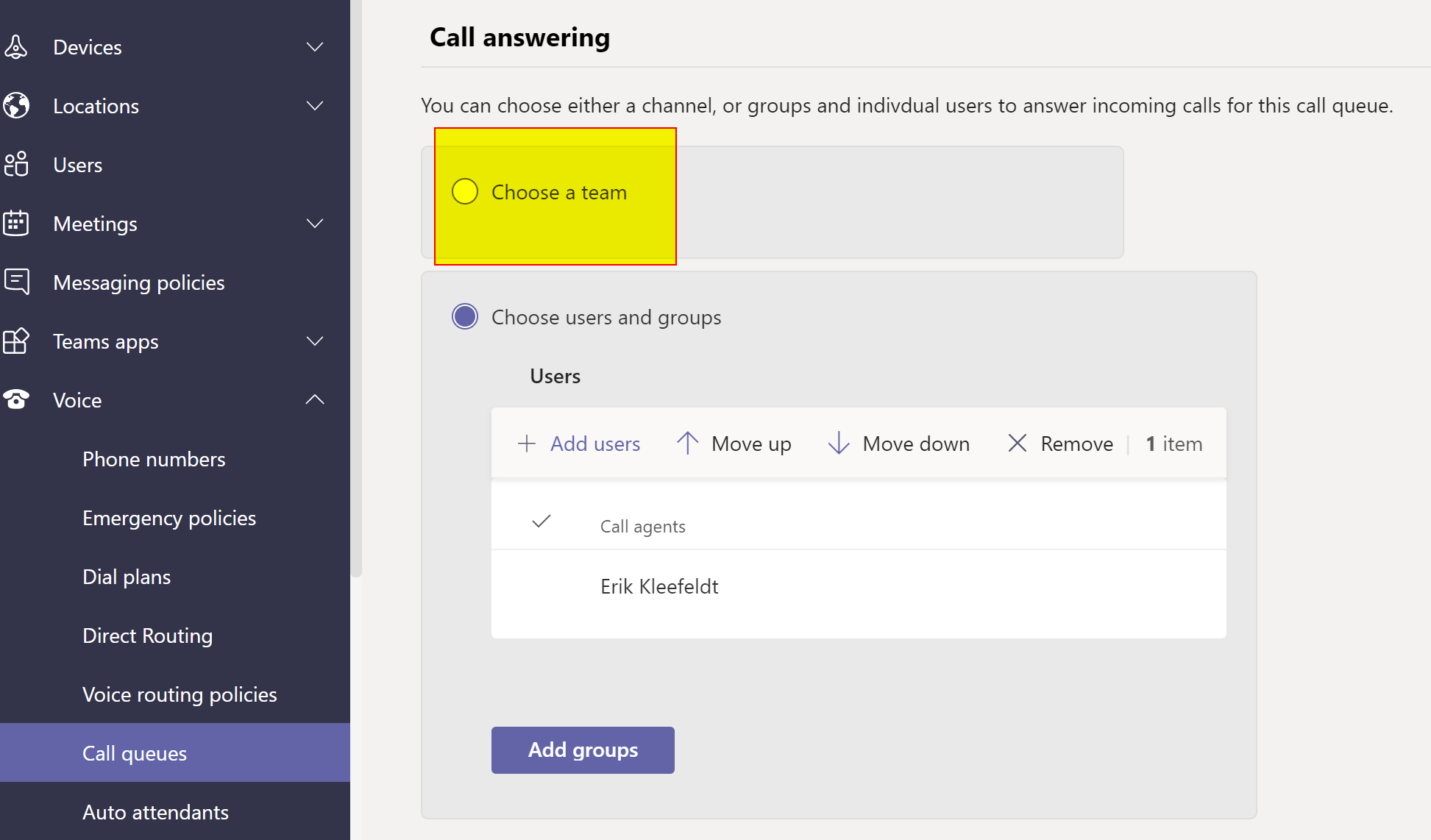
TAC -> Voice –> Call Queues
TAC -> Voice –> Call Queues –> Call answering
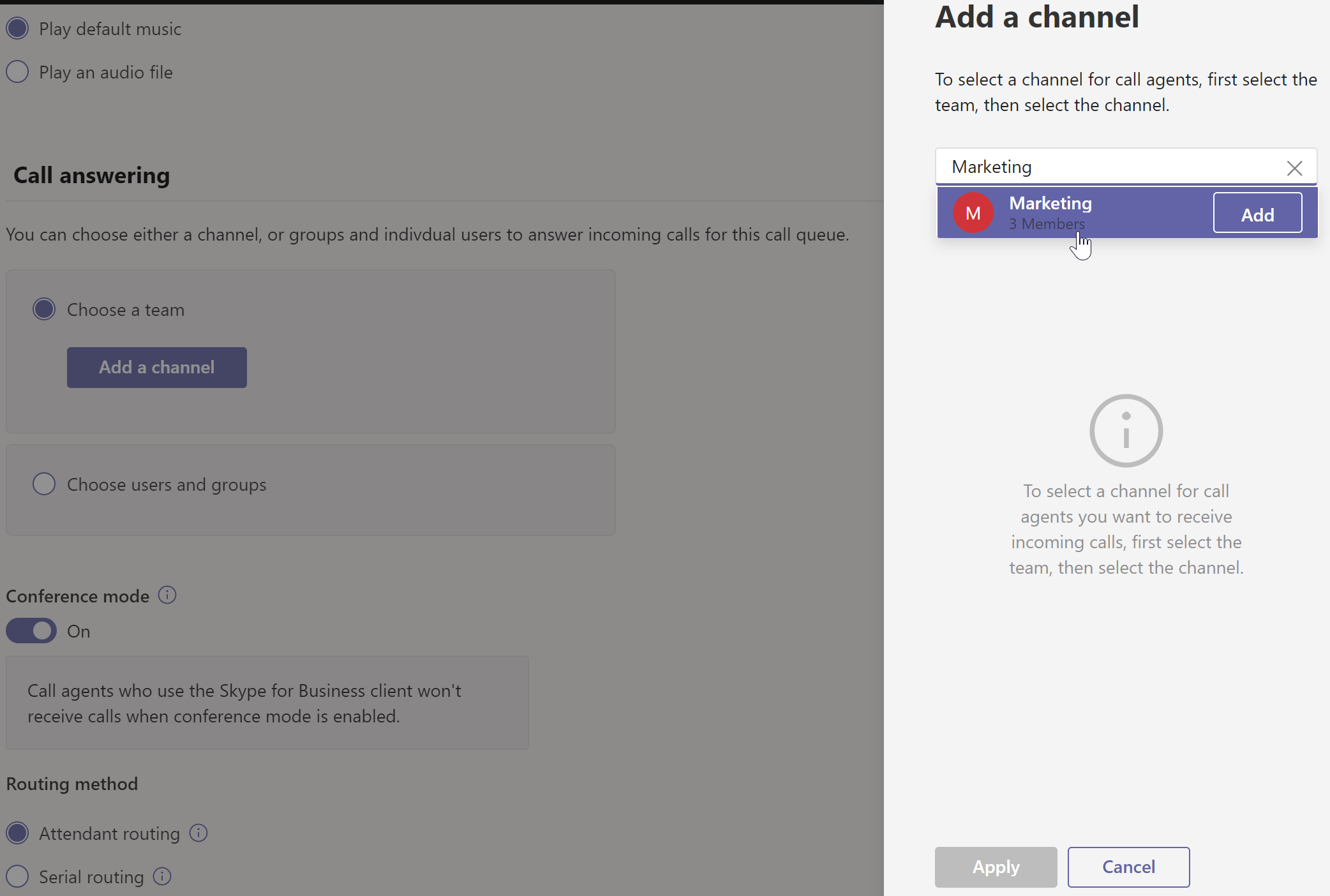
Call Queues –> Call answering –> Team
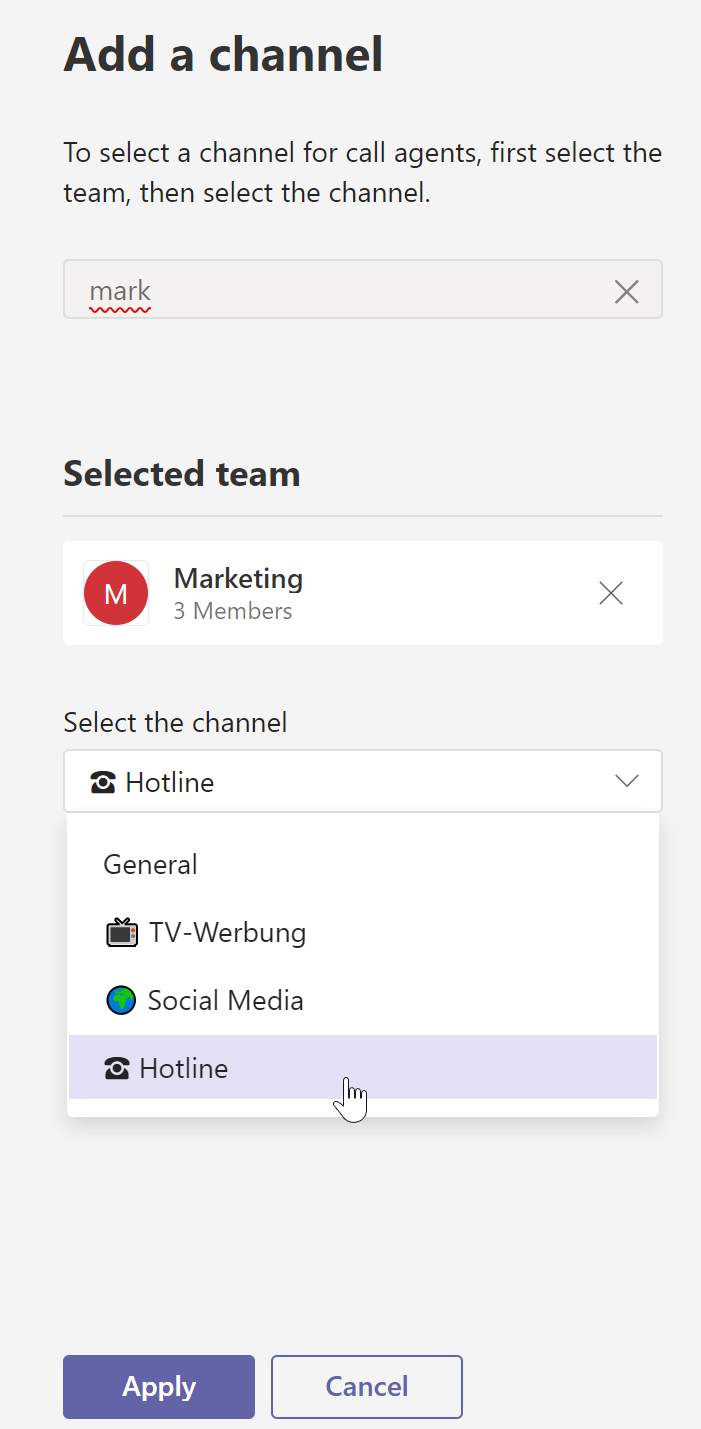
Call Queues –> Call answering –> Team –> Channel selection

After applying the channel selection and saving the call queue you can switch to the Teams channel or tell the users that the channel can soon receive calls. In my tenant it took some time till it showed up and worked.

Teams Channel
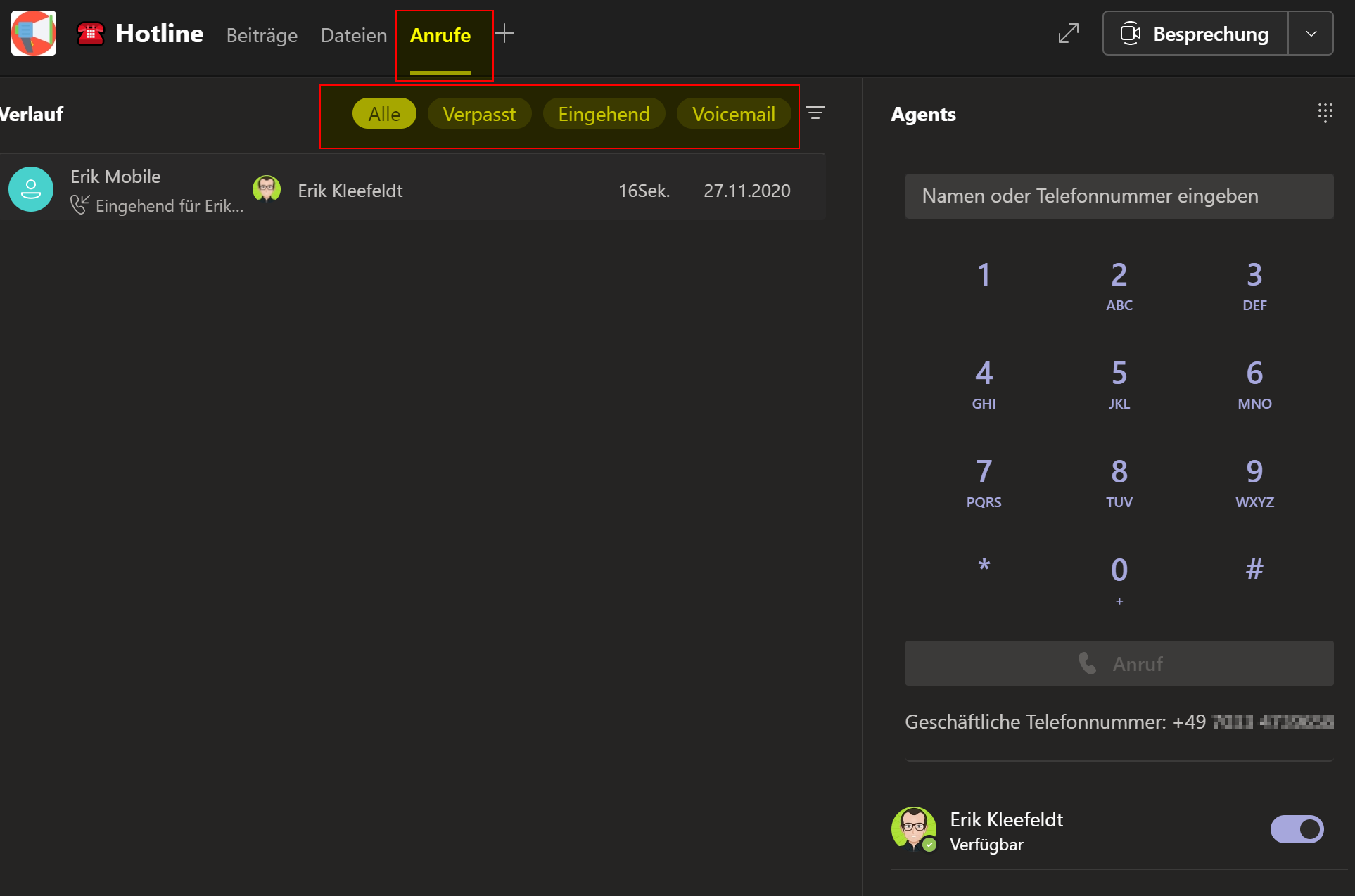
Teams Channel –> Calls tab

Conclusion, opinion and summary

In my opinion, there are some use cases where the feature can help, not to mention the examples of the roadmap.

Voice-enabled channels might compensate today’s lack of a proper missed call notifications for (user-configured) call groups in Microsoft Teams, although an administrator has to configure a call queue with one or more numbers. In voice-enabled channels you can immediately communicate regarding a phone call and if you’ll get the ability to adjust the channel for calling as mentioned in the roadmap you might not need (user-configured) call groups where you have the issue that every user gets a missed call notification if no one would answer or you get a missed call notification without any feedback in regards of did someone else of the (user-configured) call group answer the call already or not. In the past, in SFB Enterprise Voice, as far as you used call groups you could see that you missed a call and which person of the call group answered it.

I think it can enable users, Teams owners, to better manage call settings for the respecitve group which reduces work for IT admins by giving Team owners the ability to manage their call (queue) channel settings by themselves instead of requesting IT support to do this for them. That’s a big advantage. So, this could be interesting, I guess that we might see a few Teams “hotlines” using call queues transfering from as-is to voice-enabled channels in order to self-manage their voice and calling settings. We’ll shall see.

At the time of writing this post, the capability was not yet available, at least not in my M365 tenant and the documentation was also not yet available providing further details. I’m looking forward to testing it.

Additional resources


Discover more from erik365.blog

Subscribe to get the latest posts sent to your email.

13 responses to “Calling gets integrated into channels within Teams in Microsoft Teams”

  1. Kevin Bruggemans Avatar
    Kevin Bruggemans

    Hello Erik,

    This feature has been available since 2021, but it does not work.
    Each agent only sees the calls that HE has taken and the missed calls are also not visible.
    Do you know when Microsoft will finally correct this?

    Best Regards

    Kevin

    Like

    1. erik365online Avatar

      Hello Kevin,
      That’s true. Unfortunately I don’t know if and when Microsoft is planning to change this. Maybe we’ll get a more complete solution in fall 2024? The Queue App could address this basic feature request. However this is just my personal hope and not sure. Plus the Queue App is a Teams premium feature.
      Erik

      Like

  2. Make an outbound call with different phone number in Microsoft Teams – erik365.blog Avatar

    […] there is something similar available based on voice-enabled channels. The difference is that you have to configure the call queue to use a Teams channel instead of […]

    Like

  3. Philippe Tschumi Avatar
    Philippe Tschumi

    Hi Erik, do you still see the Missed and Incoming Buttons? We don’t have it (anymore). So the most important, to discover missed calls is not possible.

    Like

    1. Erik Avatar

      Hello Philippe,
      Yes, I can still see the buttons for the missed and incoming calls.
      But only if I have the Teams client app on Windows maximized on 1920×1080. If I reduce the Teams app’s window size it’s showing only the button “All” and “Voicemail” but not “Missed” and “Incoming”.
      Best Regards
      Erik

      Like

      1. Philippe Tschumi Avatar
        Philippe Tschumi

        Hi Erik, yes 1920×1080 and 100% setting and above will show the buttons. Thanks. The next question is, if any missed calls appear there? I got only calls displayed which I accepted, no missed ones.

        Like

        1. Erik Avatar

          Hi Philippe,
          I usually configure call overflows to deal with unanswered calls like sending them to the voicemail of a M365 group or forward it to a mobile.

          Nevertheless, I disabled call overflow handling in the CQ in Teams, so that calls are disconnected after 2+ calls or 30 seconds.
          After the configuration changed I made some test calls to the AA –> CQ –> Team channel. It was ringing but I was not answering. The call was disconnected after 30 seconds, as configured, ok. But the unanswered call I missed and did not answer did not show up in the missed calls list. It did not show up at all. I also clicked another channel, came back but this did not change the list and did not show the missed calls. I also restarted the Teams app, also no change. This needs further investigation.
          Best Regards
          Erik

          Like

          1. Philippe Tschumi Avatar
            Philippe Tschumi

            Hi Erik

            I got a feedback on this from Microsoft Support: They call it a “draft” of the Teams app where this feature is not yet available. They will likely remove the missed call tab with an update and push it again, when feature will work. The funny thing behind is, that the road map item is set to launched and it seems difficult to find out when that feature will be released.

            Like

          2. Erik Avatar

            Hi Philippe, Thank you for sharing this. That’s really interesting to know that there are buttons without function yet.

            Like

  4. Paul Bouten Avatar
    Paul Bouten

    Hi Erik, We have tried to set it up tonight but aren’t able to select a channel. The Team we select does have channel but we don’t see them to select in the Call Queue. In the Team itself there is no option to enable a channel for voice.
    What do we do wrong?
    Regards, Paul

    Like

    1. Erik Avatar

      Hi Paul,
      did you give it a few minutes or hours time before directly adding the channel to the call queue?
      I’d guess that Teams might need some time before it shows up to add it. In my case I created a new Team channel and the other day I associated the queue with the channel.
      KR,
      Erik

      Like

  5. Tim Kremers Avatar
    Tim Kremers

    Hi Erik,

    Thank you for writing this article. It’s very helpful. I do have a question. This morning I enabled Collaborative Calling. I notice that I am unable to determine an order when I use “Serial Routing”. By opting for “Users and Groups” you are able to determine who is the first person in the queue. But when I enable Collaborative Calling I cannot seem to determine this anymore. Have you by chance found a way to configure Serial Routing combined with Collaborative Calling?

    KR,

    Tim

    Like

    1. Erik Avatar

      Hi Tim, thank you. No, I haven’t yet tried and figured out a option for serial routing with collaborative calling. BR, Erik

      Like

Leave a reply to erik365online Cancel reply

I’m Erik

Welcome to Erik’s blog, your go-to space for curated updates and insights on Microsoft Teams, Copilot, and Microsoft 365. Join me as we explore the latest developments, share valuable information, and spread knowledge. This blog not only serves as a source of news but also as my personal collection of notes, openly shared with you all. Let’s elevate teamwork and productivity together!

Let’s connect